The 5 Best Karaoke Machines for Epic Parties
Nothing breaks the ice, fuels the fun, and creates unforgettable memories quite like karaoke. It’s the ultimate party starter, giving everyone — from shower-singing superstars to reluctant crooners — a chance to grab the mic and own the stage.
This guide will cut through the noise and show you the absolute best karaoke machines available today. Whether you’re planning a huge backyard bash, a fun family night, or just need a portable solution for spontaneous singalongs, we’ve found the perfect machine for you. We’ve also packed this guide with everything else you need: setup tips, the best karaoke apps, song ideas, troubleshooting advice, and much more.
📋 What’s Inside This Guide
- What Makes a Great Karaoke Machine? A Buyer’s Guide
- Karaoke Machines by Budget
- Our Top 5 Karaoke Machine Picks
- Full Comparison Table
- How to Set Up Your Karaoke Machine at Home
- The Best Karaoke Apps to Use With Your Machine
- Building the Ultimate Song Library
- Karaoke Party Hosting Tips
- Getting the Best Sound Quality
- Common Troubleshooting Problems & Fixes
- Karaoke Machine Maintenance Guide
- Outdoor Karaoke: What You Need to Know
- Karaoke for Kids: A Parent’s Guide
- Frequently Asked Questions
What Makes a Great Karaoke Machine? A Buyer’s Guide
Before you buy, let’s break down the key features that separate the chart-toppers from the one-hit-wonders. Understanding these fundamentals will help you invest wisely and avoid buyer’s remorse.
1. Connectivity is King
How you play your music is the most important factor. Bluetooth is a non-negotiable feature, allowing you to stream audio and karaoke videos instantly from YouTube on your phone, tablet, or smart TV. Also look for USB ports (for pre-loaded songs) and AUX inputs. More premium machines include Wi-Fi, allowing direct access to streaming karaoke platforms without needing a separate device. HDMI output is another excellent feature — it lets you send the video signal directly to your TV so lyrics display on a large screen.
2. Microphones: Go Wireless for Duets!
A great karaoke night needs duets. Look for machines that include two microphones. Wireless UHF mics are the gold standard, offering better range and less interference than older VHF models or wired mics, which can get tangled. The microphone quality dramatically affects how your voice sounds — cheap mics introduce hissing, feedback, and distortion, which can kill the party vibe fast. Also check the range (measured in feet or meters) for wireless mics; a good machine should give you at least 30 feet of wireless freedom.
3. Sound Quality & Power
Speaker power is measured in watts (W). For a living room party, 40–60W is plenty. For larger spaces or outdoor use, look for 80W or more. Good sound quality means clear vocals without distortion, even at high volumes. Look for machines with dedicated tweeters (for high-frequency clarity) and woofers (for bass), as separate drivers produce a much more balanced sound than a single all-in-one speaker cone.
4. Built-in Effects & Mixing Controls
The best machines include at minimum a treble/bass control and an independent microphone volume knob. More advanced units offer reverb (a classic echo effect that makes any voice sound more polished), pitch correction, key control (to raise or lower the song’s key to match your range), and even voice-changing effects for laughs. An echo effect, when used subtly, can genuinely make amateur singers sound much more confident and professional.
5. Display & Lyrics
Some machines have a built-in screen to show lyrics. While convenient, modern alternatives — like casting from your phone to your TV over HDMI or Chromecast — are often better. The key thing is having a clear way for the singer to follow the words. A large TV screen connected via HDMI is often the best solution for larger groups.
6. Battery Life & Portability
If you plan to use your machine outdoors or in different rooms, a built-in rechargeable battery is invaluable. Look for machines that offer at least 6–8 hours of battery life on a single charge. Many portable machines charge via USB-C, which is convenient. If portability is your top priority, also consider the total weight — some rolling speaker machines can weigh 15–20 lbs, which is manageable but not truly backpack-friendly.
7. Song Library & Expansion
Some machines come with a small built-in library of pre-loaded songs. While it’s a nice bonus, don’t make this your primary decision factor. The most flexible and future-proof approach is to choose a machine with strong Bluetooth and internet connectivity, then stream from YouTube or dedicated karaoke apps, which gives you access to virtually unlimited tracks. If you have an existing collection of karaoke CDs, then a machine with a CD+G player becomes more relevant.
Karaoke Machines by Budget: Which Tier Is Right for You?
One of the first questions you’ll face is how much to spend. Karaoke machines range from under $30 to over $300, and understanding what each price tier offers will save you from disappointment.
Budget Pick
Great for kids, casual use, and gifting. Expect wired mics, modest sound, and basic connectivity. The BONAOK Q37 lives here.
Mid-Range
The sweet spot. Wireless mics, solid sound, rechargeable battery, and Bluetooth. Best for home parties and family use.
Premium
Powerful output (80W+), long battery life, UHF wireless mics, and durable build. Ideal for large gatherings and serious enthusiasts.
Keep in mind that a mid-range machine with solid Bluetooth connectivity paired with a free YouTube karaoke channel will almost always outperform a more expensive machine with a small built-in library of outdated songs. Invest in connectivity first, hardware quality second, and built-in song libraries last.
Our Top 5 Karaoke Machine Picks
We’ve selected five amazing machines that excel in different categories, ensuring there’s a perfect pick for every party and budget.

1. JYX D10 — Best Overall Party Machine
The JYX D10 is an absolute beast and our top pick for anyone serious about hosting amazing parties. This all-in-one rolling speaker packs a huge punch with its powerful 80W output and deep bass. It comes with two high-quality wireless UHF microphones that feel great and sound clear.
| Type | All-In-One Rolling Speaker |
|---|---|
| Power | 80W |
| Mics | 2x Wireless UHF |
| Key Feature | Powerful sound, long battery life, wheels |
With a long-lasting rechargeable battery and rugged wheels, you can easily take the party from the living room to the backyard. Its multitude of inputs (Bluetooth, USB, AUX) means you can play music from any source. The built-in disco lights complete the party atmosphere. The JYX D10 also features independent mic and music volume controls, plus a dedicated reverb knob so every singer gets that polished, studio-style echo that makes even nervous first-timers sound confident.
- Incredibly powerful sound
- Excellent wireless UHF mics
- Great battery life (8–10 hrs)
- Portable and durable with wheels
- Works indoors and outdoors
- Larger and heavier than other models
- No built-in screen
- Higher price point

2. Singing Machine SML385 — Best for Family Fun
The Singing Machine is a classic for a reason. This model is the perfect self-contained unit for families. It features a built-in CD+G player (for traditional karaoke discs) and connects easily to your TV for displaying lyrics. The main draw is its simplicity and dazzling disco light effects.
| Type | All-In-One with CD+G Player |
|---|---|
| Power | ~10–15W |
| Mics | 1x Wired (with 2nd input) |
| Key Feature | Built-in CD player and disco lights |
While it also has Bluetooth for modern connectivity, its ability to play older karaoke CDs makes it versatile. The sound is perfect for a kid’s room or living room, and the flashing lights create an instant party vibe that children absolutely love. The second microphone input means siblings can duet without anyone feeling left out — a surprisingly important feature for family peace!
- Very easy to set up and use
- Fun built-in light show
- Plays both CDs and Bluetooth audio
- Great value for families
- Sound not powerful enough for large crowds
- Comes with only one wired mic
- CD+G format is dated for new buyers

3. Moukey MTs10-1 — Best Portable Pick
For karaoke on the go, this compact cube from Moukey is an amazing choice. It’s lightweight, fully rechargeable, and surprisingly loud for its size. It’s the perfect companion for beach trips, tailgating, or just moving from room to room.
| Type | Portable Cube Speaker |
|---|---|
| Power | ~40W Peak |
| Mics | 1x Wired (with 2nd input) |
| Key Feature | Compact, lightweight, and rechargeable |
This machine proves that good things come in small packages. It features fun sound effects, flashing lights, and full connectivity via Bluetooth or USB. It’s an ideal first karaoke machine for kids and a fantastic grab-and-go option for adults who want to keep things casual without lugging around a massive speaker on wheels.
- Extremely portable and lightweight
- Great sound for its size
- Rechargeable battery
- Affordable price point
- Not ideal for large parties
- Wired microphone limits movement
- Bass is limited at high volumes
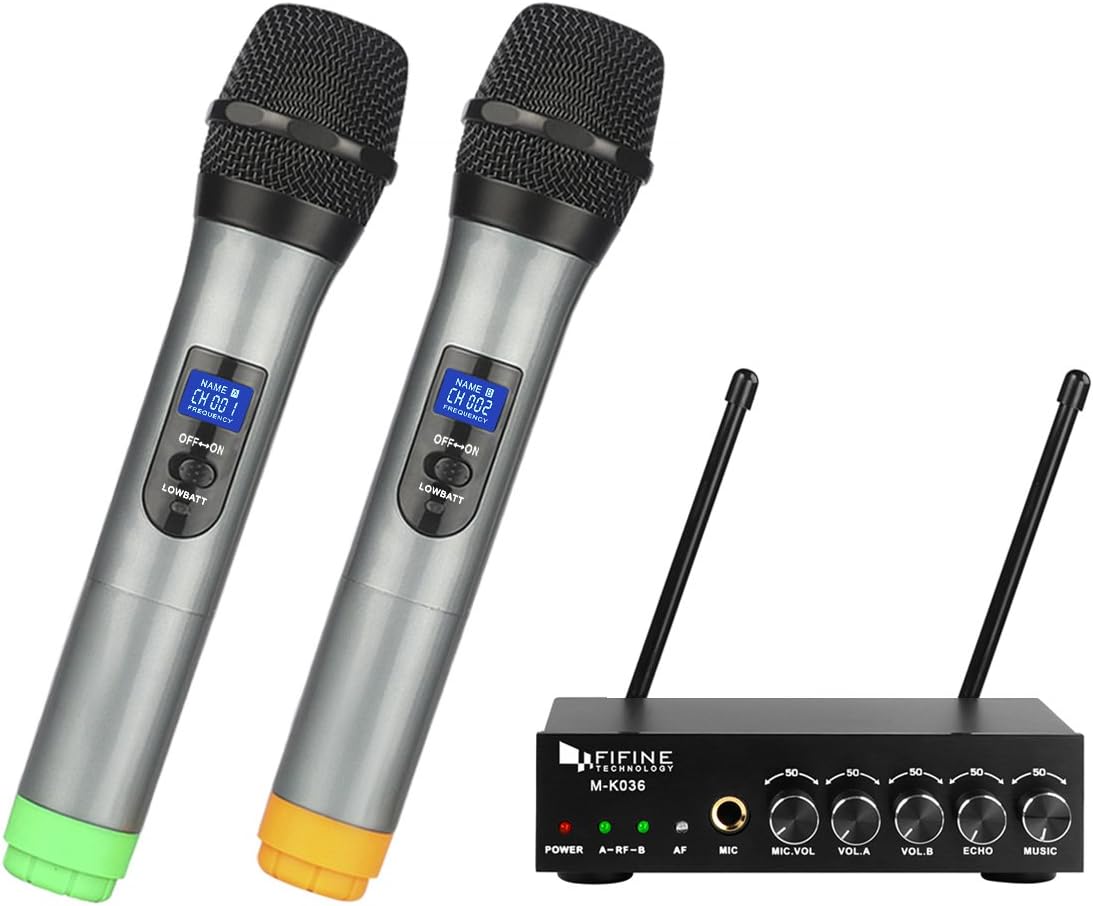
4. Fifine K036 — Best for Home Theater Setups
Already have a great TV and soundbar? Then you don’t need another giant speaker. This clever system from Fifine is just a compact receiver and two excellent wireless mics. You plug the receiver into your speaker or soundbar, and it wirelessly mixes your voice with the music from your TV.
| Type | Wireless Mic Mixer System |
|---|---|
| Power | N/A (uses your speaker) |
| Mics | 2x Wireless UHF |
| Key Feature | Integrates with existing sound systems |
This is the perfect minimalist solution for getting high-quality karaoke sound without the clutter. You get the freedom of great wireless mics and the powerful sound of your existing home audio setup. It’s an elegant and effective way to upgrade your home theater into a karaoke stage. The setup takes about five minutes — just plug the small receiver into your soundbar’s AUX input and you’re ready to sing.
- Uses your high-quality home speakers
- Excellent value for two wireless mics
- Minimalist and clutter-free
- Easy 5-minute setup
- Requires an existing speaker with an input
- No built-in lights or effects
- Range can vary by environment

5. BONAOK Q37 — Best for Casual Fun & Gifts
This wildly popular device shrinks an entire karaoke machine into a single microphone. It connects to your phone via Bluetooth, and you sing along to your favorite tracks as the music and your voice play directly from the speaker built into the microphone’s base.
| Type | All-in-One Microphone Speaker |
|---|---|
| Power | ~5W |
| Mics | 1 (it IS the mic) |
| Key Feature | Ultra-portable, all-in-one design |
While it won’t power a party, it’s undeniably fun for carpool karaoke, a silly office break, or as a fantastic gift for kids and adults alike. It’s simple, hilarious, and the easiest way to have a spontaneous singalong anywhere, anytime. If you’re looking for a creative gift idea for someone who loves music and fun, look no further.
- The ultimate in portability
- Incredibly fun and easy to use
- Makes a perfect gift
- Rechargeable and inexpensive
- Low sound volume
- Not suitable for groups
- Limited sound effects and controls
Full Head-to-Head Comparison Table
Not sure which machine wins in your specific category? This table breaks down every key spec side by side so you can make a data-driven decision.
| Feature | JYX D10 | Singing Machine SML385 | Moukey MTs10-1 | Fifine K036 | BONAOK Q37 |
|---|---|---|---|---|---|
| Best For | Big parties | Families/kids | Portability | Home theater | Casual / gifts |
| Power Output | 80W | ~12W | ~40W | Uses your setup | ~5W |
| Wireless Mics | ✓ 2x UHF | ✗ Wired only | ✗ Wired only | ✓ 2x UHF | — Built-in |
| Bluetooth | ✓ | ✓ | ✓ | ✗ (AUX only) | ✓ |
| USB Input | ✓ | ✓ | ✓ | ✗ | ✗ |
| CD+G Player | ✗ | ✓ | ✗ | ✗ | ✗ |
| Rechargeable Battery | ✓ (8–10 hr) | ✗ AC Only | ✓ (6 hr) | ✗ AC Only | ✓ (5–6 hr) |
| Built-in Lights | ✓ | ✓ | ✓ | ✗ | ✗ |
| Outdoor Ready | ✓ | ✗ | ⚠ Small spaces | ✗ | ⚠ Very small |
| Reverb / Echo | ✓ | ⚠ Basic | ✓ | ⚠ Mic level only | ⚠ Basic |
| Price Range | $$$ | $$ | $$ | $ | $ |
How to Set Up Your Karaoke Machine at Home: Step-by-Step
Got your new machine and ready to sing? Setting up a home karaoke system is easier than you think. Here’s a full walkthrough, covering both standalone machine setups and app-based setups using your TV.
Setup Method 1: All-in-One Machine (Standalone)
- Choose your location. Pick a spot with enough room for performers to move. Make sure you’re near a power outlet if the machine isn’t battery-powered. Ideally position the machine so it faces the audience, not a wall.
- Connect the microphones. For wired mics, plug directly into the mic input jack. For wireless mics, pair them per the manufacturer’s instructions (usually holding a pairing button on the receiver and the mic simultaneously).
- Connect your phone or device via Bluetooth. Turn on Bluetooth on your machine (if it has this feature) and pair your phone. This takes about 30 seconds.
- Open your karaoke source. Open YouTube, a karaoke app, or your music library on your phone. Search for “[song name] karaoke” on YouTube for free tracks with scrolling lyrics.
- Set your levels. Start with music volume at about 60%, and mic volume at around 50%. Adjust from there. A common mistake is having the mic volume too high relative to the music, which causes feedback.
- Enable reverb (optional but recommended). Start with reverb at about 30%. Too much echo sounds artificial; just a touch makes voices sound fuller and more confident.
- Test and enjoy! Do a quick sound check with a short song verse. Adjust EQ and levels as needed, then let the party begin.
Setup Method 2: Mixer System + Home Theater (e.g., Fifine K036)
- Connect the receiver to your soundbar or speaker. Use a 3.5mm AUX cable from the receiver’s output to your soundbar’s AUX input.
- Pair the wireless microphones to the receiver following the included instructions.
- Play karaoke tracks on your Smart TV — either via the YouTube app or a dedicated karaoke app like KaraFun.
- Adjust the mic blend knob on the receiver to find the right balance between your voice and the backing track.
- Display the lyrics on your TV. Since you’re using your Smart TV directly, the lyrics are already shown on the big screen. This is the most immersive home karaoke experience possible.
Feedback (that horrible, ear-piercing screech) happens when the microphone picks up the speaker output. To prevent it: (1) Never point the mic directly at the speaker. (2) Keep the mic volume below 70%. (3) If feedback starts, immediately lower the mic volume — don’t turn up the music volume instead. (4) For larger spaces, position speakers in front of the performance area, pointed away from the mics.
The Best Karaoke Apps to Use With Your Machine
Your karaoke machine is only as good as the song source you pair it with. While YouTube is a perfectly fine (and free) option for most people, dedicated karaoke apps offer a far superior experience with synchronized scrolling lyrics, key transposition, scoring features, and massive licensed libraries. Here are the top apps to pair with your machine.
KaraFun
Over 50,000 licensed tracks with real-time key and tempo control. Dual-screen mode perfect for home theater setups. Works on all platforms.
Singa
Professional-grade platform used by karaoke bars worldwide. Huge library, excellent video quality, and a sleek, modern interface.
Smule
A social singing community. Great for connecting with friends online and recording your performances. More community-focused than pure karaoke.
StarMaker
Popular in Asia and growing globally. Offers AI-powered voice enhancement, scoring, and a massive catalog of popular tracks.
YouTube
The simplest option. Search for “[song name] karaoke” to find millions of free tracks with scrolling lyrics. No subscription required.
Kanto Karaoke
Desktop software (Windows/Mac) for people who own their song library. Supports MP3+G and other formats. Great for hosting regular parties.
For casual home use, YouTube is all you need — it’s free, has an enormous catalog, and works on every device. For serious karaoke enthusiasts who host regularly, KaraFun is the gold standard: its dual-screen mode (one screen for the audience, one for the singer showing the upcoming lyrics) and key transposition features are genuinely game-changing.
Building the Ultimate Karaoke Song Library
The best machine in the world won’t save a party if you only have three songs that anyone knows. Building a diverse, crowd-pleasing song library is one of the most important parts of hosting a successful karaoke night. Here’s how to think about it.
Organize by Decade
A great karaoke library should span multiple generations. If you have guests ranging from 20 to 60, you need something for everyone. Plan to have a solid selection from each era: classic 60s/70s pop and rock, 80s anthems, 90s hits, 2000s pop, and current chart-toppers. Songs that everyone knows, regardless of age, are the backbone of any good library.
Must-Have Crowd Pleasers by Category
Classic Rock Anthems
Pop Hits (All Eras)
Power Ballads (Crowd Favorites)
Perfect Duets
Fun, High-Energy Party Starters
Pro Tips for Song Selection
When curating your party list, think about the range of your guests’ vocal abilities. “Easy” karaoke songs have a limited range (not too high, not too low) and a clearly defined melody that’s hard to lose track of. Reserve the big diva moments — Whitney Houston, Mariah Carey — for confident singers who genuinely want to show off. For nervous first-timers, suggest something fun and energetic with a strong, simple melody, like “Sweet Caroline” — the crowd participation aspect takes the pressure off the soloist entirely.
Before the party, share a link to a free Google Form and ask guests to pre-submit their top three song requests. This way, you can pre-load the YouTube or KaraFun links before the party starts, keeping the flow smooth and avoiding the awkward silence of searching for songs mid-party.
Karaoke Party Hosting Tips: How to Run an Amazing Night
Having the right equipment is only half the battle. The other half is knowing how to host an environment where everyone — including the shy ones — feels comfortable enough to participate. These tips will make your karaoke night truly unforgettable.
Create the Right Atmosphere
Dim the lights slightly. This lowers everyone’s inhibitions dramatically — it’s much less scary to sing in a dimly lit room than under bright overhead lights. If your machine has built-in LED lights, turn them on. Set out some snacks and drinks before guests arrive so there’s no awkward standing around while you’re still setting up. First impressions matter.
Warm Up the Crowd
Don’t start with the most reserved person in the room — you need an enthusiastic opener to set the tone. Either be that person yourself, or recruit a confident friend in advance to volunteer to go first. The first two or three performances set the energy for the entire evening. Once a few people have gone and laughed and survived, the floodgates open.
Run a Singer Rotation
Use a simple sign-up system: a notebook, a whiteboard, or even just a verbal queue. Managing the rotation prevents the same two or three people from hogging the mic while others wait nervously. It also means everyone gets a turn, which creates a sense of fairness and inclusion that is key to the social dynamics of a great karaoke night.
Set Some Ground Rules
The cardinal rule of karaoke is: be supportive, always. Make it clear at the start that everyone sings and no one judges. If someone struggles with a song, the crowd should sing louder to carry them along, not laugh at them. Good karaoke hosts actively celebrate every performance, no matter the quality. This is about fun, not talent.
Use Themes for Extra Fun
Themed karaoke nights take things to the next level. Consider: 80s Night, Disney Classics Only, One-Hit Wonders, Movie Soundtracks, or “The Worst Song You Know.” Themes give hesitant singers a framework that removes self-consciousness — it’s no longer about your personal taste, it’s about finding the most gloriously bad example of the theme.
Manage Energy With Song Order
Think of the night like a DJ set. You want to build energy, peak somewhere in the middle-to-late portion, and then bring things down smoothly towards the end. Don’t let five slow ballads in a row kill the vibe. Similarly, starting with five back-to-back high-energy songs can exhaust the crowd before the night really gets going. A good mix of tempos, matched to the reading of the room, is the key to a long, sustained great party.
Getting the Best Sound Quality From Your Karaoke Machine
Even a mid-range machine can sound incredible if you set it up and use it correctly. These tips will help you maximize the audio quality of whatever machine you own.
Speaker Placement
Placement has an enormous impact on perceived sound quality. Keep speakers away from corners (which amplify bass in an often unpleasant way) and off the floor when possible. If your machine has a handle or is designed to stand on a surface, position it at about chest height. This ensures the sound projects towards the audience rather than at their knees.
EQ Settings
Most karaoke machines have at least basic treble and bass controls. A common mistake is cranking the bass too high, which makes the overall sound muddy and hard to understand. For vocal clarity, start with bass at 50%, midrange at 60% (if available), and treble at around 55–60%. Vocals live in the midrange; boosting it slightly brings singers forward in the mix.
Microphone Technique
Believe it or not, how you hold and use the microphone significantly affects the sound. Keep the microphone approximately 3–5 cm from your mouth. Too far away and your voice becomes distant and quiet; too close and you’ll get “plosives” (that thumping pop when you say words with P or B). Tilt the mic slightly downward at a 45-degree angle rather than pointing it directly into your mouth for the most natural sound.
Reverb: The Magic Ingredient
Even a modest amount of reverb (echo) can make a significant difference in how voices sound. Start at around 25–30% on the reverb dial. Used tastefully, reverb smooths out imperfections, fills in gaps between phrases, and generally makes every voice sound more “produced.” Too much reverb, though, creates an unpleasant tunnel effect that makes lyrics harder to understand. Less is more.
Clipping is a form of audio distortion that happens when the volume signal exceeds what the speaker can handle. You’ll hear it as a harsh, crackling, or buzzing sound at high volumes. If you hear clipping, lower the volume — don’t try to compensate with EQ. Running your machine at 80–85% of maximum volume typically produces the best balance of loudness and audio quality.
Common Karaoke Machine Problems & How to Fix Them
Even the best equipment runs into issues sometimes. Here’s a troubleshooting guide for the most common problems you’ll encounter.
Problem: Feedback / High-Pitched Screeching
Cause: The microphone is picking up the speaker output, creating a loop. Fix: Lower the mic volume. Make sure the mic is not pointed at the speaker. Move the mic away from the speaker or reposition the speaker so it faces away from where people are singing.
Problem: Bluetooth Won’t Connect
Cause: The device is already paired to another Bluetooth source, or is out of range. Fix: Turn Bluetooth off and on again on your phone. Delete the karaoke machine from your phone’s saved Bluetooth devices and re-pair from scratch. Make sure you’re within 30 feet of the machine with no thick walls between you.
Problem: Voice Sounds Hollow or Echoey
Cause: Reverb is set too high. Fix: Reduce the reverb/echo dial to below 40%. Experiment until the voice sounds natural but polished.
Problem: Music Plays But No Sound From Microphone
Cause: Mic volume knob is at zero, mic is muted, or (for wireless mics) the mic battery is dead. Fix: Check the dedicated mic volume control (separate from the music volume). Check if there’s a mute button on the mic itself. For wireless mics, check or replace the batteries.
Problem: Sound Distorts at High Volume
Cause: You’re pushing the speakers beyond their limits (clipping). Fix: Lower the master volume to 80% and lower the bass EQ. If you need more volume, consider a more powerful machine or an external PA speaker.
Problem: Wireless Mic Range Is Very Short
Cause: Interference from other wireless devices (Wi-Fi routers, other Bluetooth devices), or obstacles between the mic and receiver. Fix: Move the receiver away from Wi-Fi routers and other electronics. If the machine uses UHF, try changing the frequency channel if the option is available.
Karaoke Machine Maintenance: How to Make Yours Last
A karaoke machine is an investment in fun. With proper care, a quality machine should give you years — even decades — of reliable service. These simple maintenance habits will protect your investment.
Regular Cleaning
After each use, wipe down the exterior of the machine and microphones with a soft, dry cloth. Avoid harsh chemicals or wet wipes, which can damage finishes. For the grille of wired microphones, use a dry cotton swab to gently clear out any dust that has accumulated, which can muffle the sound over time.
Battery Care
For machines with built-in lithium-ion batteries, avoid letting the battery fully drain to zero regularly — this degrades battery life faster. Try to charge between 20% and 80% for the longest battery lifespan. Don’t leave the machine plugged in constantly once it’s fully charged. For wireless mics with AA batteries, always remove the batteries when storing them for extended periods to prevent corrosion.
Safe Storage
Store your machine in a cool, dry place away from direct sunlight. Heat and moisture are the main enemies of electronics. If you have the original box, use it for storage. Wrap microphone cables loosely — never coil them tightly, as this stresses the internal wiring and leads to connectivity problems over time.
Software and Firmware Updates
Some more advanced karaoke machines (and all app-based systems) receive software updates that improve performance, fix bugs, and sometimes add new features. Check the manufacturer’s website or app store occasionally to ensure you’re running the latest version.
Connection Care
Check your AUX cables and USB connections periodically. Wiggle them gently — if the sound cuts in and out, the cable may need replacing. Quality cables are inexpensive and a common cause of mysterious sound issues. If you use a machine outdoors occasionally, inspect the speaker grilles after each outdoor use and brush off any dust, dirt, or debris before storing.
Outdoor Karaoke: Setting Up the Perfect Backyard Sing-Along
Taking karaoke outside opens up a whole new world of possibilities — summer BBQs, pool parties, backyard weddings, and camping trips. But outdoor audio has its own unique challenges that you need to plan for.
Volume Needs
Sound dissipates very quickly outdoors. A machine that sounds impressively loud indoors may feel underwhelming outside. As a rule of thumb, double your indoor wattage requirements for outdoor use. For a backyard of 20–30 people, you’ll want at least 80W, and ideally more. The JYX D10 at 80W is our recommendation for this use case — it’s the minimum that will genuinely fill an outdoor space without straining.
Protect Your Equipment
Most consumer karaoke machines are not rated as waterproof or even water-resistant. Keep your machine away from pool splash zones, sprinklers, and rain. Use a canopy or umbrella if there’s any chance of precipitation. Keep extension cords and connections off wet ground. If you’re serious about regular outdoor use, look for machines that advertise an IPX rating for water resistance.
Power Solutions
For truly wireless outdoor setups, a machine with a built-in battery is invaluable. Alternatively, a portable power station (essentially a large battery pack with AC outlets) can power a standard machine anywhere in your yard without needing to run extension cords from the house.
Neighbor Considerations
The joy of outdoor karaoke can be the misery of your neighbors. Be mindful of the time (most areas have noise ordinances after 10 PM or 11 PM), and if you’re going to run late, give your immediate neighbors a heads up. Pointing your speakers away from neighboring properties helps reduce the noise nuisance significantly.
Karaoke for Kids: A Parent’s Complete Guide
Karaoke is one of the most joyful activities you can introduce to children. It builds confidence, encourages a love of music, and teaches them that making a “mistake” (singing off-key) is something to laugh about, not be ashamed of. Here’s everything parents need to know.
Best Age to Start
Kids as young as 3–4 years old love singing along to familiar songs, even if they can’t read the lyrics yet. For younger children, the key is familiarity — use songs from their favorite TV shows, movies (Disney is always a hit), or nursery rhymes. From age 6–7 onwards, most children can start following scrolling lyrics with some help, and from about age 8, they can fully use a karaoke machine independently.
Best Songs for Kids
Choosing the Right Machine for Children
For kids, prioritize durability, safety, and simplicity over power and features. The Moukey MTs10-1 and BONAOK Q37 are both excellent choices — they’re lightweight enough for children to handle safely, simple enough that they can operate independently, and affordable enough that you won’t be heartbroken if they drop it. Avoid machines with sharp edges, hot surfaces (some machines with high-powered amplifiers can get warm), and long cables that become trip hazards.
Karaoke as a Confidence Builder
The social and developmental benefits of regular karaoke for children are genuinely significant. Public speaking and performance anxiety are among the most common fears in adults, and they frequently trace back to a lack of early exposure to positive performance experiences. Karaoke, in a supportive home environment, gradually desensitizes children to the feeling of being watched and listened to — and links that feeling to joy and applause rather than anxiety. It’s one of the most fun confidence-building tools available to parents.
Frequently Asked Questions (FAQ)
No! Any modern smart TV, tablet, or even a smartphone works perfectly. The easiest method is to use the YouTube app to search for “song name + karaoke”. You’ll find thousands of tracks with lyrics right on the screen. You then send the sound to your karaoke machine via Bluetooth.
A CD+G (Compact Disc + Graphics) is a special type of CD that displays low-resolution graphics (the lyrics) on a TV when played in a compatible machine. While it was the standard for decades, it’s largely been replaced by streaming from YouTube and apps. However, machines that play them are great if you already have a large collection of karaoke discs.
Many modern karaoke machines have a “vocal remover” or “vocal cut” button. This feature uses an audio trick to remove center-panned vocals from a standard song, turning it into an instrumental. The quality can vary, but it’s a fun feature that dramatically expands your song library. For better results, dedicated apps like Lalal.ai use AI-powered vocal separation that produces much cleaner results.
UHF (Ultra High Frequency) and VHF (Very High Frequency) are the two radio frequency bands used by wireless microphones. UHF is the superior choice: it operates on a higher frequency band that experiences less interference from household electronics like Wi-Fi routers, baby monitors, and TVs. UHF mics also tend to offer better range and a more stable connection. Always choose UHF when the option is available.
As a general guide: for a small bedroom or living room (up to 10 people), 10–30W is sufficient. For a medium room or open-plan space (10–30 people), 40–60W is ideal. For large indoor spaces or small outdoor gatherings, 80W+ is recommended. For a large outdoor party of 50+ people, you’d want 150W+ or a dedicated PA system.
Generally, no — most consumer karaoke machines aren’t designed to be daisy-chained together. If you need more volume, a better solution is to connect your machine’s line output (often an AUX out) to a separate powered PA speaker. This effectively uses your karaoke machine as a mixer while the PA speaker handles the additional amplification.
Yes! YouTube is the most powerful free option — search for “[song name] karaoke” to find an almost unlimited library of free karaoke tracks with scrolling lyrics. For a more dedicated experience, apps like Smule and StarMaker offer a limited free tier. The free tiers usually have ads and a restricted song catalog, but they’re more than enough to get started and test your setup before committing to a paid subscription.
Absolutely! All the machines on our list can function as regular Bluetooth speakers for music playback. Many of them are excellent party speakers in their own right — particularly the JYX D10, which with its 80W output is a genuinely powerful Bluetooth speaker that can replace a dedicated party speaker for most needs. Just connect your phone via Bluetooth and stream your music as normal.
For a small apartment, the Moukey MTs10-1 or the Fifine K036 system are the best choices. The Moukey gives you a compact, self-contained unit with decent sound for small spaces. The Fifine system is even better if you have a decent soundbar already — it adds wireless mics with minimal footprint. Both are apartment-appropriate in terms of size and volume levels that won’t immediately cause neighbor complaints.
Conclusion: It’s Your Time to Shine!
A great karaoke machine is an investment in pure fun. It brings people together and gives everyone permission to be a little silly and a lot loud. From the party-starting power of the JYX D10 to the minimalist genius of the Fifine Mixer, there’s a perfect machine to get your party started — and now you have everything else you need to make the night unforgettable: the right setup, the best apps, the most crowd-pleasing songs, and the confidence to host like a pro.
Remember: karaoke is never about how good you sound. It’s about how much fun you create. The person who commits fully to a terrible performance of a cheesy song is always the star of the night. So pick your machine, connect your phone, queue up your favorite anthem, and grab that microphone.
Your stage awaits. The crowd is ready. Now go make some memories. 🎤