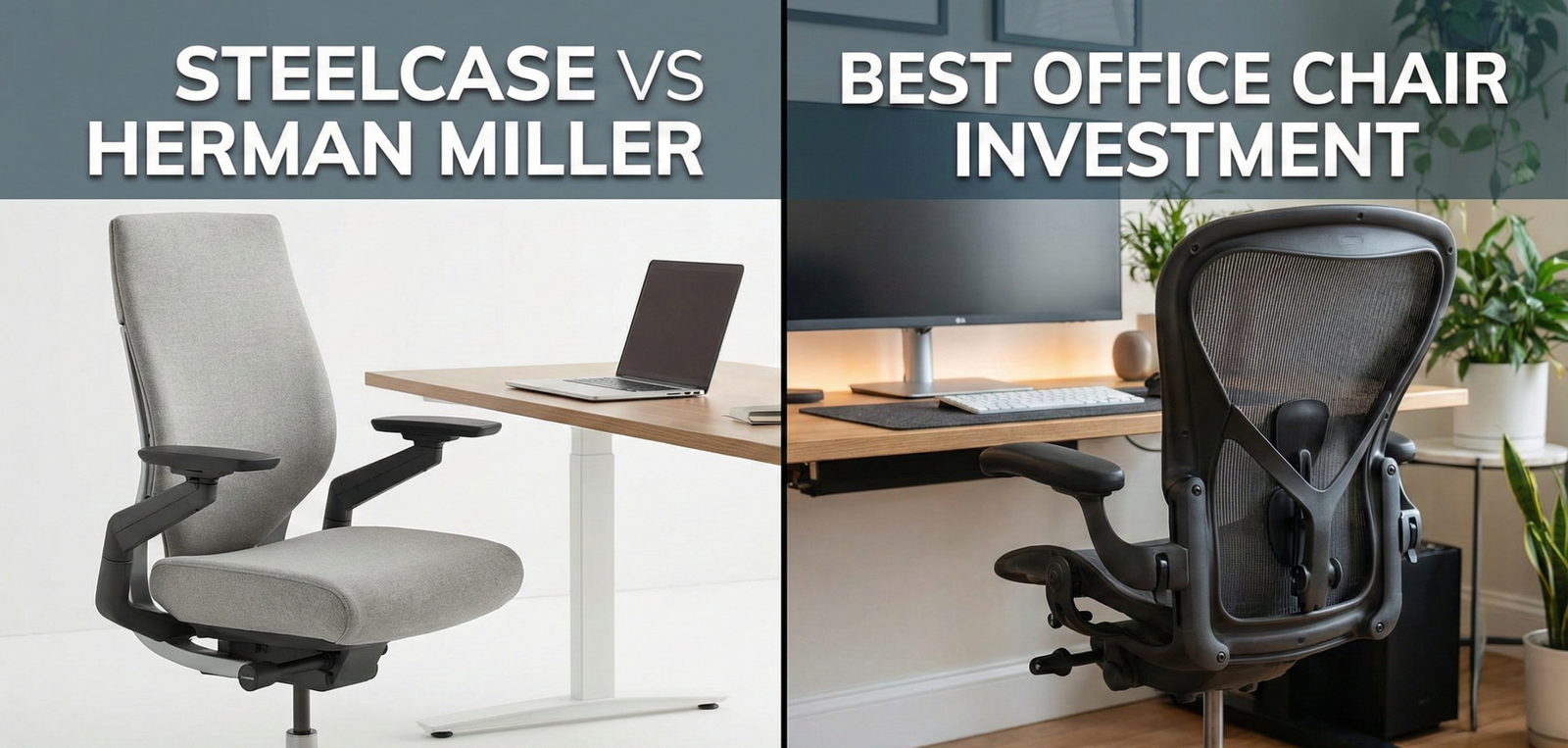
Steelcase vs. Herman Miller: Which Office Chair is the Better Investment?
If you work at a desk for 8 hours a day, your chair is not furniture—it is medical equipment. The difference between a $150 “manager’s chair” from an office supply store and a research-backed ergonomic task chair is profound. It is the difference between ending your day with lower back pain, neck tension, and fatigue, and ending it with energy and a body that has been properly supported throughout 2,000+ hours of annual use.
In the world of high-end seating, there are two undisputed heavyweights: Herman Miller and Steelcase. Both have defined the industry for decades. Both offer 12-year warranties. Both typically cost over $1,000 new. But they approach sitting in fundamentally different ways, attract different types of users, and excel in different scenarios. This is not a case of one being objectively better than the other—it is a case of one being substantially better for you, and the answer depends on your body, your budget, and how you actually sit.
Why Your Chair Investment Matters More Than You Think
Most people will spend more time in their office chair over the next decade than they will spend in their car—yet they’ll budget $40,000 for a vehicle and balk at spending $1,200 on a chair. The math simply doesn’t hold up when you examine the numbers. A 12-year warranty on a $1,400 chair works out to approximately $117 per year, or roughly $0.46 per working day assuming a standard 250-day work year. That is less than a cup of coffee, for equipment that directly impacts your spinal health, daily productivity, and long-term musculoskeletal wellbeing.
The Real Cost of a Cheap Chair
The hidden costs of inadequate seating are rarely factored into purchasing decisions. Chronic lower back pain—the number one cause of disability globally—has a direct economic impact on both employers and individuals through lost productivity, sick days, physical therapy costs, and in severe cases, surgical intervention. Research from occupational health studies consistently demonstrates that investing in ergonomic seating reduces musculoskeletal disorder claims, decreases absenteeism, and improves measurable productivity metrics in knowledge workers.
A cheap office chair doesn’t just hurt your back. It affects your ability to concentrate: when you are physically uncomfortable, a portion of your cognitive bandwidth is continuously diverted to managing that discomfort. Studies measuring cognitive performance in uncomfortable versus ergonomically optimized seating conditions show meaningful differences in focus, decision-making speed, and self-reported mental fatigue. Your chair is literally affecting the quality of your work output, not just your physical comfort.
The “Cost Per Year” Calculation
Consider the actual cost-per-year comparison: a $200 basic office chair that needs replacement every 3-4 years costs approximately $50-67 per year. A $1,400 Herman Miller or Steelcase chair lasting 15-20 years (they routinely do with minimal maintenance) costs $70-93 per year—barely more than the cheap option—while providing dramatically better support and avoiding the gradual degradation that characterizes budget chairs. When you factor in the therapeutic and productivity benefits, the premium chair is almost certainly the better economic decision for anyone who sits for a living.
The Corporate Endorsement Signal
It’s worth noting that virtually every major technology company, law firm, financial institution, and corporate enterprise that cares about employee performance and retention buys Herman Miller or Steelcase in bulk. This is not accidental. Organizations that have analyzed the ROI of ergonomic seating at scale consistently conclude that the productivity gains and reduced healthcare costs justify the premium. When Google, Apple, and Goldman Sachs all choose these two brands for their headquarters, it is meaningful market validation.
The Science of Ergonomics: What Makes a Chair Actually Work
Before comparing models, understanding the biomechanical principles behind ergonomic chair design helps you evaluate features intelligently rather than simply comparing spec sheets. Both Herman Miller and Steelcase have invested tens of millions of dollars in human factors research, and their flagship chairs encode decades of that research into their designs.
The Lumbar Lordosis Problem
The human lumbar spine has a natural inward curve (lordosis) that distributes the compressive forces of sitting across the vertebral discs optimally. When you sit in a chair without adequate lumbar support, your pelvis tends to rotate backward (posterior pelvic tilt), flattening this curve and creating uneven pressure on the intervertebral discs—particularly L4-L5 and L5-S1, the most commonly injured disc levels. Over months and years, this sustained pressure accelerates disc degeneration, contributes to herniation, and is the primary mechanism behind desk-job back pain. Both the Herman Miller Aeron’s PostureFit SL system and the Steelcase Leap’s lower back firmness control directly address this by supporting and encouraging the natural lumbar curve.
Intradiscal Pressure and Sitting Position
Research from orthopedic surgeon Alf Nachemson famously measured intradiscal pressure in lumbar discs across different body positions. Sitting upright generates approximately 140% of the pressure compared to standing. Sitting with a forward lean generates up to 185%. The implication is clear: the more you can support an upright or slightly reclined sitting position with proper lumbar support, the more you reduce the compressive load on your spinal discs across your working day. This is the foundational science behind why both the Aeron and the Leap are designed to encourage specific postural positions—they are reducing your cumulative daily disc load.
The Problem with “Perfect Posture”
Ironically, the most ergonomically sophisticated research of the past decade has moved away from the concept of a single “perfect” posture. We now understand that the worst thing for spinal health is not bad posture—it is static posture. Any fixed position held for extended periods, even a textbook-perfect upright position, creates fatigue in spinal stabilizer muscles and sustained disc compression. This is the key philosophical difference between Herman Miller and Steelcase: Herman Miller guides you toward an optimal fixed position, while Steelcase’s LiveBack technology is designed to encourage continuous micro-movement and postural variability throughout the day.
Seat Pan Design and Circulation
The seat pan (the part you actually sit on) is arguably the most ergonomically important component of any chair, yet it receives the least marketing attention. The ideal seat pan should: distribute weight across the full ischial (sitting bone) surface, maintain a slight forward tilt to encourage lumbar lordosis, and have a “waterfall” or flexible front edge that doesn’t compress the posterior thigh arteries and femoral nerve. The Steelcase Leap’s flexible seat front edge specifically addresses this circulation concern, making it one of the better choices for individuals with leg circulation issues or sciatic nerve symptoms.
Armrest Science: The Neglected Variable
Correctly positioned armrests reduce the muscular load on the neck and shoulder girdle by up to 25%. When your arms are unsupported, the trapezius, levator scapulae, and rhomboid muscles work continuously to hold your arms up against gravity—contributing directly to the neck and shoulder tension that plagues desk workers. The key adjustment parameters are: armrest height (elbows at 90° with forearms parallel to floor), width (arms naturally close to body without shoulder abduction), and depth (supporting the forearm rather than just the elbow). The Steelcase Gesture has the most sophisticated armrest system available in any production chair—a direct competitive advantage over the Aeron’s more limited arm adjustability.
Philosophy: Design-Forward vs. Adaptive Engineering
Herman Miller: “Sit Correctly”
Herman Miller is fundamentally an icon of mid-century modern design that happens to make excellent ergonomic furniture. Their philosophy is prescriptive and confident. They believe there is an optimal way to sit—informed by decades of human factors research—and their chairs use suspension mesh, rigid frames, and precisely calibrated lumbar systems to guide you into that posture. Sitting in an Aeron feels like being cradled and corrected simultaneously. The chair has opinions about how you should sit, and it expresses those opinions through its design.
This approach works exceptionally well for users who are committed to correct ergonomic posture, who work primarily in a forward-leaning task position (typing, writing, coding), and who appreciate the aesthetic prestige of sitting in what is arguably the most recognized piece of office furniture in history. The Aeron has appeared in more design museums than perhaps any other object designed for the workplace. It is the chair equivalent of an Eames lounger—functional art.
The drawback of this prescriptive approach is that it punishes deviation. If you sit cross-legged, the Aeron’s hard plastic frame edges dig into your shins. If you tuck a leg under you, the mesh can feel uncomfortable. If you frequently recline deeply to read or think, the lumbar support system can feel like it’s pushing you forward against your will. Herman Miller chairs reward disciplined upright sitters and penalize fidgeters.
Steelcase: “Sit How You Want”
Steelcase is an engineering and workplace research company first, and a furniture manufacturer second. Their philosophy is adaptive and empirical. They observe how people actually sit—which includes slouching, fidgeting, sitting cross-legged, leaning heavily to one side, and texting with arms not near the keyboard—and they design chairs that accommodate all of these behaviors without punishing the user.
The Leap V2’s “LiveBack” technology is a spine-mimicking flexible backrest that changes shape as you move, maintaining contact and support regardless of your postural variation. The Gesture’s armrests can track your arms across a 360-degree range of motion, accommodating tablet use, phone use, and virtually any arm position a modern knowledge worker might adopt. Steelcase chairs don’t tell you how to sit—they follow you wherever you go.
This adaptive philosophy is increasingly validated by modern ergonomic research, which emphasizes dynamic movement and postural variation over static “perfect” positions. For users who work across multiple device types, take frequent calls, or simply can’t maintain a rigid upright posture for hours, the Steelcase approach is often more comfortable and, arguably, more physiologically beneficial over long sessions.
The Classics: Herman Miller Aeron vs. Steelcase Leap V2
This is the battle that sparked a thousand Reddit threads. The Aeron is the most famous office chair in history—it survived the dot-com crash, defined Silicon Valley aesthetics, and has been sitting in offices for nearly 30 years. The Leap V2 is the quiet workhorse that corporate ergonomics departments consistently specify because it works reliably for the greatest range of users without customization headaches.
| Feature | Herman Miller Aeron | Steelcase Leap V2 |
|---|---|---|
| Material | Pellicle Mesh (Suspension) | Fabric & Foam (Cushion) |
| Sizing | 3 Sizes (A, B, C) | One Size Fits Most |
| Seat Feel | Firm, Floating, Rigid Frame | Contoured, Flexible Edge |
| Lumbar | PostureFit SL (sacral + lumbar) | Lower Back Firmness + Height Adj. |
| Armrests | Up/Down, Pivot (limited range) | 4D (Height, Width, Depth, Pivot) |
| Recline | Tilt Limiter (3 positions) | Natural Glide System (continuous) |
| Seat Depth | Fixed per size | Adjustable (2″ range) |
| Best For | Hot sleepers, posture-focused, minimalists | Fidgeters, cushion lovers, varied sitters |
| New Price (approx.) | $1,300–$1,800 | $1,000–$1,400 |
| Warranty | 12 years (all parts + labor) | 12 years (parts + labor) |
The Aeron: Everything You Need to Know
The Aeron’s defining feature is its Pellicle suspension mesh—a material that distributes your body weight across an 8-zone tension system rather than a foam pad. This creates the sensation of floating rather than sitting, eliminates pressure points, and provides exceptional breathability. In warm office environments or for anyone who runs warm, the mesh back and seat is genuinely transformative compared to foam-padded alternatives.
The 2016 “Remastered” update addressed the most common criticisms of the classic Aeron: the PostureFit SL now supports both the sacrum and lumbar regions (the original only supported the lumbar), the tilt mechanism has been improved, and the 8Z Pellicle mesh has zone-differentiated tension for better pressure distribution. If you tried an Aeron a decade ago and found it uncomfortable, the remastered version is meaningfully better.
Sizing is the most critical variable with the Aeron. Size A is for smaller frames (under 5’4″ / 130 lbs), Size B fits the majority of users (5’3″–6’0″ / 130-230 lbs), and Size C accommodates larger frames (6’0″+ / 200+ lbs). Getting the wrong size is one of the most common Aeron purchase mistakes—particularly buying a B when you need a C, which results in the hard plastic rear frame edge digging into the back of your thighs.

Herman Miller Aeron (Remastered)
The icon. Best for users who run hot and want breathable mesh. Forces excellent posture. Critically important: check the size chart (A, B, or C) before purchasing—wrong sizing is the most common Aeron complaint.
Check Price on AmazonThe Leap V2: Everything You Need to Know
The Leap V2’s signature feature is its LiveBack technology—a backrest that flexes and changes shape as you move, mirroring the natural movement of your spine. Unlike the Aeron’s rigid frame, the Leap’s back has two distinct zones that move independently: the upper back flexes separately from the lower back, maintaining lumbar support and contact regardless of your recline angle or lateral movement. This dynamic response is why the Leap is consistently rated highly by people who find the Aeron’s rigid structure uncomfortable after long sessions.
The Leap also features Steelcase’s Natural Glide System—a recline mechanism that allows the seat and back to move simultaneously as you recline, keeping you positioned close to the screen rather than moving you away from it as you lean back. This is ergonomically significant because it means you can recline comfortably without reflexively leaning forward to compensate, reducing neck strain during relaxed reading or thinking postures.
The Verdict on Classics: Buy the Aeron if you get hot easily, want breathable mesh, and sit primarily in an upright forward-lean task position. Buy the Leap V2 if you prefer a cushioned feel, want superior armrests, vary your sitting position frequently, or have cushion preference from prior experience.
The Modern Flagships: Herman Miller Embody vs. Steelcase Gesture
If the Aeron and Leap represent the established classics, the Embody and Gesture represent the cutting edge of ergonomic science applied to modern digital work habits. Both cost more, both offer more, and both represent their manufacturer’s most sophisticated thinking about how people work today.
Herman Miller Embody: The Back Pain Chair
The Embody was designed in collaboration with physicians, physical therapists, and industrial designers with a singular focus: to be the best possible chair for the human back. Its most distinctive visual feature—the “pixelated” back composed of hundreds of individually responsive pixels arranged in a central spine column—is functional, not decorative. Each pixel adjusts independently to the shape and movement of your back, creating what Herman Miller calls a “micro-climate of comfort” that supports every contour of your specific spine.
The Embody’s design philosophy extends to circulatory health: by distributing weight across a larger surface area with minimal pressure points, it reduces the compression of blood vessels under the thighs that contributes to the leg numbness and circulation issues common with conventional seating. It also uses a “tilt limiter” that opens the hip angle as you recline, maintaining the spine’s natural lordosis even during extended reclined sitting—a feature that is clinically relevant for people recovering from back injuries or managing chronic lumbar conditions.
The Embody is widely regarded as the single best chair available for people with diagnosed back conditions, herniated discs, or chronic lower back pain. It is also the most visually distinctive chair in either brand’s lineup—if you want people to know you take your workspace seriously, the Embody communicates that immediately.
Steelcase Gesture: The Multi-Device Chair
The Gesture emerged from a landmark Steelcase research initiative that studied over 2,000 workers across 11 countries to understand how technology adoption had changed the way people sit. The finding was striking: modern knowledge workers no longer sit in one posture for extended periods—they cycle continuously between laptop mode, monitor mode, tablet mode, phone mode, and relaxed recline mode, each requiring different body positions and arm configurations. No existing chair adequately supported all of these modes simultaneously.
The Gesture’s response to this finding is its most remarkable feature: 360-degree rotating arm caps that can pivot inward to support phone use with elbows close to the body, track outward to support tablet use with arms extended, or position conventionally for keyboard/mouse use. These arms essentially function as robotic limb supports that accommodate the full range of modern computing behaviors. For people who work across multiple devices or take many phone calls, the Gesture’s armrest system is without peer in the industry.
The Gesture also features one of the most adjustable seat pans available—depth-adjustable to accommodate different leg lengths—and a back that reclines from full upright to a relaxed open-hip angle without the sitting surface relationship feeling unnatural at any point in the range.
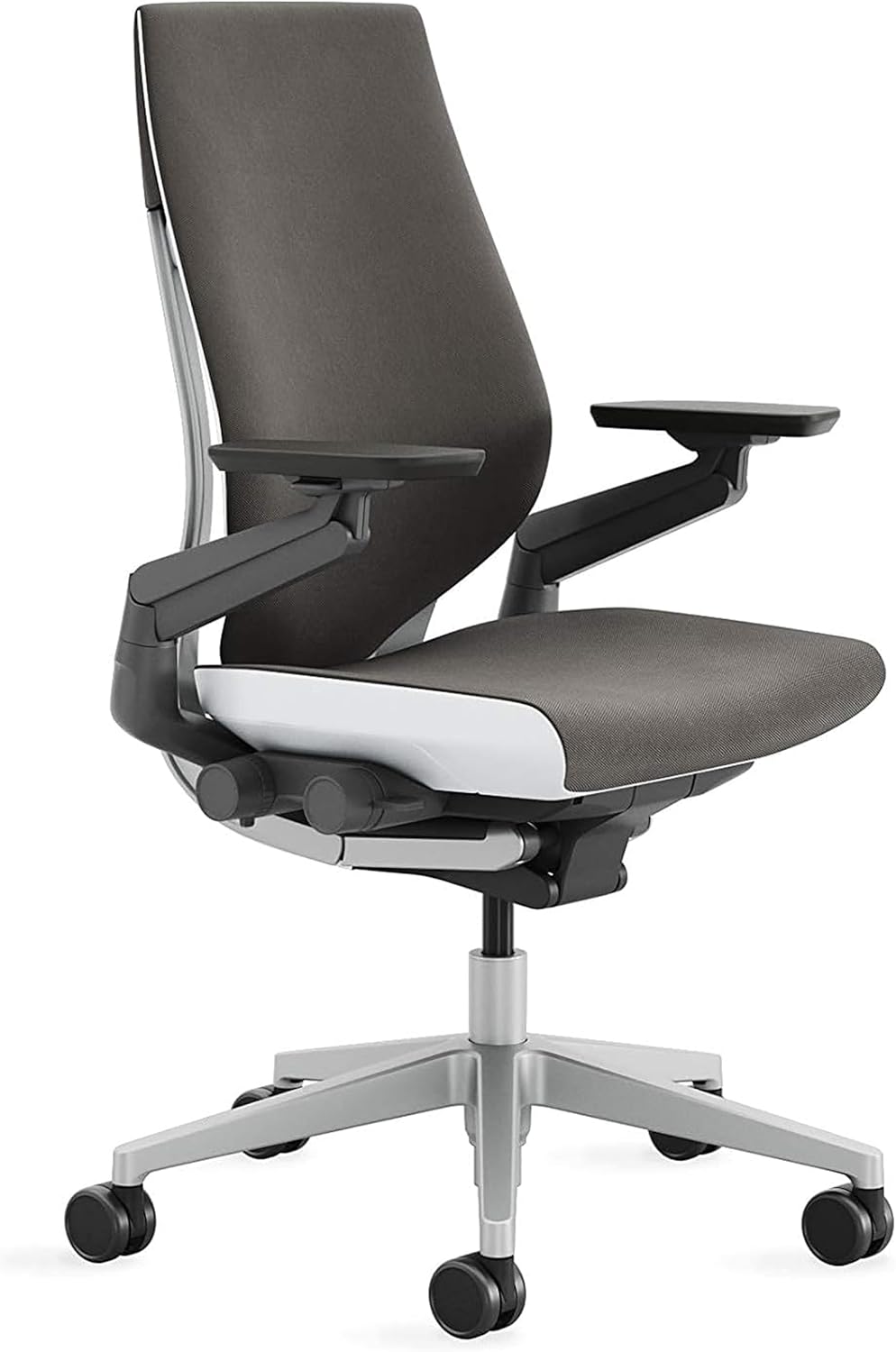
Steelcase Gesture
The most adjustable chair ever made. Perfect for multi-device users and anyone who works across laptop, tablet, and phone. The headrest model is strongly recommended for sessions exceeding 4 hours.
Check Price on AmazonThe Herman Miller x Logitech Embody: Gaming Edition
The collaboration between Herman Miller and Logitech G produced the “gaming” Embody—the standard Embody with additional cooling foam layers in the seat and back and a distinctive color scheme designed for gaming aesthetic preferences. Ergonomically, it is identical to the standard Embody. The additional foam layer does provide marginally improved thermal comfort during extended gaming sessions, but the core ergonomic benefit is the same. It represents an interesting marketing strategy that successfully introduced premium ergonomic seating to a demographic (gamers) that had previously been dominated by Racing-style chairs with poor ergonomics.
Best Chair by Body Type & Physical Profile
The most important variable in ergonomic chair selection is often one that gets the least attention in reviews: your actual physical dimensions and any existing musculoskeletal conditions. Here is a practical guide by body type.
Petite Frames (Under 5’4″ / 120 lbs)
Aeron Size A is purpose-built for this profile. The Leap V2’s one-size-fits-most approach means the seat depth may require maximum extension for shorter legs. The Gesture can work well with seat depth at minimum.
Average Frames (5’4″–5’11” / 140–200 lbs)
The widest choice. Aeron B is the ideal size. Both the Leap V2 and Gesture fit this range comfortably. Decision comes down to mesh vs. foam preference and sitting style.
Tall Frames (6’0″+ / 200+ lbs)
Aeron C is the correct size—undersizing is a common and costly mistake. The Leap V2 handles height well but can feel narrow at the hips for broader frames. Gesture accommodates both height and width better.
Lower Back Pain / Herniated Discs
Herman Miller Embody is the strongest choice—its individual pixel support and open hip-angle recline specifically reduce lumbar disc compression. The Steelcase Leap’s flexible seat front also reduces sciatic nerve pressure.
Hot Sitters / Warm Climates
Aeron is the unambiguous winner. The Pellicle mesh provides airflow that foam-backed alternatives simply cannot replicate. If you frequently overheat at a desk, the Aeron’s breathability is a quality-of-life game-changer.
Leg Circulation Issues / Sciatica
Steelcase Leap V2 is the preferred choice. Its flexible waterfall seat edge reduces compression on the posterior thigh and sciatic nerve pathway. Gesture is a close second. Aeron’s rigid plastic frame edges can worsen this issue.
Pregnancy / Postpartum
The Leap V2’s adjustable seat depth and flexible seat edge accommodate changing body dimensions better than the fixed-size Aeron approach. The Gesture’s highly adjustable armrests also adapt well to varying posture needs.
Older Adults / Arthritis
Ease of ingress and egress matters as mobility decreases. The Gesture’s adjustment controls are more ergonomically accessible than the Aeron’s. The Embody’s pressure-distributing surface benefits arthritis patients who experience joint pain from sustained pressure points.
Athletic / Muscular Builds
Broader shoulder width can make the Aeron’s standard backrest feel narrow. The Gesture’s wider back profile and adjustable arm width accommodates athletic builds more comfortably. Aeron C sizing helps if the frame is the issue.
Best Chair by Work Style & Usage Pattern
Beyond physical profile, how you actually work—the tasks you perform, the devices you use, and the hours you spend seated—should heavily influence your choice.
The Pure Keyboard Worker (Programmer, Writer, Data Analyst)
If 90%+ of your work is keyboard-based, sitting in a consistent forward-lean task posture, the Aeron is your optimal chair. Its suspension mesh, PostureFit SL lumbar system, and posture-enforcing design are precisely calibrated for this mode. The breathability advantage also matters most for people who sit in one position for 6-8 hours without frequent position changes. The Aeron was fundamentally designed for this archetype.
The Multi-Device Professional (Designer, Executive, Consultant)
If your day involves cycling between laptop, external monitor, tablet, phone calls, and video conferencing—sometimes within a single hour—the Steelcase Gesture is the only chair in either brand’s lineup that genuinely accommodates all of these postures. Its 360-degree arm system is the specific differentiating feature here. The Leap V2 is a reasonable alternative if the Gesture is over budget.
The Creative (Architect, Designer, Video Editor)
Creative work often involves long periods of deep concentration alternating with highly physical engagement (reaching across large screens, leaning toward reference materials, sketching). The Leap V2’s dynamic LiveBack and Natural Glide System accommodate postural variability well. Some creatives specifically prefer the Embody for its pressure-distribution, which allows for very long uninterrupted sessions without discomfort becoming a distraction.
The Remote Worker (Home Office, Variable Hours)
Home office users often use their chair for more than just work—watching content, reading, video calls with different ergonomic contexts than traditional office tasking. The Gesture’s adaptability across these use modes makes it the best overall choice for home office versatility. If budget is the priority constraint, the Leap V2 offers the best performance-to-price ratio in either lineup.
The Gamer (Long Session, Entertainment + Work)
Gaming chairs with racing bucket aesthetics are nearly universally poor ergonomic choices—their prominent neck pillows encourage forward head posture and their bolstered side panels restrict natural movement. The Herman Miller x Logitech Embody is the strongest dedicated gaming ergonomic option, combining the Embody’s clinical back support with gaming-specific thermal management. The standard Gesture with headrest is also an excellent gaming chair for players who want maximum adjustability. Both dramatically outperform any “gaming chair” from brands like Secretlab or DXRacer on measurable ergonomic metrics.
The Practical Decision Framework
If you run hot or sit primarily upright typing: Herman Miller Aeron. If you have back pain or want maximum pressure relief: Herman Miller Embody. If you fidget or sit in multiple positions: Steelcase Leap V2. If you use multiple devices or want the most adjustable chair ever made: Steelcase Gesture.
Durability & Warranty: A Deep Dive
Both brands offer 12-year warranties, but the practical experience of claiming that warranty differs meaningfully between them.
Herman Miller’s Warranty in Practice
Herman Miller’s 12-year warranty covers all parts, all materials (including fabric grades 1-4 and mesh), and labor for the full 12 years. Their warranty service is generally regarded as industry-leading: they will often send a technician to your location to repair the chair rather than asking you to ship it. For something as heavy as an Aeron, this matters. Their dealer network is extensive, and the experience of getting warranty service through authorized dealers is typically smooth and professional.
What is particularly noteworthy about Herman Miller’s warranty is its coverage of the Pellicle mesh itself. The mesh is under constant tension and theoretically subject to sagging or failure over time. Herman Miller covers mesh degradation, which is a meaningful commitment given that mesh replacement is otherwise a substantial cost. In practice, Pellicle mesh on properly sized Aerons very rarely fails within 12 years—but knowing you’re covered provides meaningful peace of mind.
Steelcase’s Warranty in Practice
Steelcase’s 12-year warranty similarly covers parts and labor but operates slightly differently in practice. Fabric grades are covered for either 5 or 10 years depending on the grade selected, while mechanical components are covered for the full 12 years. Steelcase typically asks you to coordinate warranty service through an authorized dealer, which may involve shipping components rather than an on-site technician visit—somewhat less convenient than Herman Miller’s approach for home office users in locations without nearby dealers.
The reliability of Steelcase chairs is, if anything, slightly higher than Herman Miller on a mechanical component basis. The Leap V2 has fewer complex components than the Aeron (no suspension mesh tension system, simpler tilt mechanism) and its failure points are correspondingly fewer. Long-term owners of both brands report comparable real-world durability—both routinely perform well beyond the 12-year warranty period with normal use.
The True Cost-Per-Year Math
Budget Chair ($200, replaced every 3 years)
~$67 per year. Foam compresses and loses support within 12-18 months. Gas cylinder failure common by year 2-3. No warranty service after 1 year. Gradual ergonomic degradation that you adapt to without noticing.
Mid-Range Chair ($500, replaced every 5 years)
~$100 per year. Better initial ergonomics but foam still degrades. 3-5 year warranties are common but dealer support is inconsistent. Often discontinued models make parts unavailable.
Herman Miller Aeron ($1,400, lasting 15+ years)
~$93 per year. Mesh maintains tension for 10-15+ years. 12-year full warranty with professional service. Resale value of $400-700 after 10 years further reduces effective cost. Ergonomic performance maintained throughout.
Steelcase Leap V2 ($1,100, lasting 15+ years)
~$73 per year. Foam retains acceptable support for longer than budget alternatives due to higher-density formulations. 12-year warranty. Resale value of $250-500 after 10 years. The most cost-effective premium option on a per-year basis.
Pricing, Resale Value & the Used Market Strategy
New Pricing Overview
- Herman Miller Aeron Remastered: $1,295–$1,795 depending on size and options (headrest, arm type, finish)
- Herman Miller Embody: $1,895–$2,195 (standard); $1,795–$1,995 (gaming edition, often on sale)
- Steelcase Leap V2: $995–$1,395 depending on fabric grade and options
- Steelcase Gesture: $1,095–$1,595 depending on headrest inclusion and fabric
Where to Buy New at a Discount
Both brands have authorized dealer networks that occasionally run promotions, particularly around major holidays and fiscal year-end periods (March-April for many companies). The brands’ own websites offer financing options. Purchasing through Amazon (using the links in this article) provides competitive pricing, straightforward returns, and Prime shipping—a practical option for home office buyers who don’t have a local showroom to test chairs in person.
The Used Market: Your Best Value Strategy
Because both Aeron and Leap chairs last 15-20+ years, the used market is vibrant and offers genuinely excellent value. The primary sources of used premium chairs are: corporate liquidations (when companies downsize, relocate, or change furniture standards), estate sales, and specialty refurbishers. The key channels include:
- Corporate liquidation dealers (BTOD.com, Crandall Office Furniture, Sit4Less): The gold standard for used purchases. These dealers refurbish chairs, replace worn components (gas cylinders, arm pads, casters), and offer their own warranties. You pay more than random Craigslist purchases but get quality assurance.
- Facebook Marketplace and Craigslist: Excellent for local deals, particularly in tech-heavy cities (San Francisco, Seattle, Austin, New York) where startup liquidations are common. Expect to pay $300-700 for an Aeron, $250-600 for a Leap V2.
- eBay: Wide selection but buyer-beware territory—photographing wear is inconsistent and shipping heavy chairs adds cost and damage risk.
Herman Miller vs. Steelcase Resale Value
Herman Miller chairs, particularly the Aeron, consistently hold resale value better than Steelcase chairs—primarily due to name recognition. The Aeron is one of the most searched and recognized chairs in the world; Steelcase has stronger corporate recognition but lower consumer brand awareness. A 10-year-old Aeron in good condition sells for $400-700, while an equivalent Leap V2 might sell for $250-500. If you plan to eventually upgrade or relocate, Herman Miller’s stronger resale position is a genuine financial advantage to factor into the total cost of ownership calculation.
Counterfeit Chair Warning
Both brands are subject to counterfeit products, particularly via certain international marketplaces. Genuine Herman Miller and Steelcase chairs always come with serial numbers that can be verified through the manufacturer’s website. If a “Herman Miller Aeron” is being offered new for under $800, it is almost certainly counterfeit. Counterfeits use inferior materials, have no warranty, and provide none of the ergonomic engineering of the genuine product. Only purchase from authorized dealers or well-documented private sellers.
Budget Alternatives: When $1,000+ Isn’t Feasible
Not everyone can or should spend over $1,000 on an office chair. For users with genuine budget constraints, several alternatives offer meaningful ergonomic improvements over standard budget chairs while remaining under $500-600 new.
| Chair | Price Range | Best For | Closer To | Key Limitation |
|---|---|---|---|---|
| Steelcase Amia | $450–$700 | Steelcase quality on a budget | Steelcase | Fewer adjustments than Leap |
| Herman Miller Sayl | $550–$900 | HM aesthetics at lower price | Herman Miller | Less adjustable lumbar than Aeron |
| Humanscale Freedom | $900–$1,300 | Automatic recline lovers | Both | Less seat adjustability |
| Haworth Fern | $1,100–$1,600 | Dynamic movement advocates | Steelcase | Harder to find used market |
| Branch Ergonomic Chair | $350–$500 | Entry-level ergonomics | Both | Foam durability limited vs. premium |
| Autonomous ErgoChair Pro | $250–$400 | Tight budget, home use | Neither | Build quality not comparable |
For buyers who genuinely cannot reach the $1,000 price point, the single best strategy is to purchase a refurbished Steelcase Leap V2 from a reputable dealer. Refurbished units from dealers like Crandall or BTOD typically cost $400-650, include a dealer warranty (often 2 years), and have had gas cylinders, casters, and arm pads replaced. This delivers 90% of the ergonomic benefit of a new Leap V2 for less than half the new price.
Chair Setup & Adjustment: Getting the Most from Your Investment
A $1,500 chair improperly adjusted provides no better ergonomic benefit than a $300 chair. Proper adjustment is the step most buyers skip, yet it is essential to actually realizing the health and comfort benefits you paid for. Here is a systematic setup protocol for both brands.
Step 1: Set Seat Height First
Sit with your feet flat on the floor (or a footrest if needed) and thighs parallel to the ground. Your hips should be at or slightly higher than knee height—a mild forward tilt of the pelvis (about 5-10 degrees) is ideal for lumbar lordosis. For the Aeron, this is the primary height adjustment. For the Leap and Gesture, also verify the seat depth at this point—adjust so there is 2-3 finger-widths of space between the seat front edge and the back of your knees.
Step 2: Lumbar Support Calibration
For the Aeron’s PostureFit SL: engage the sacral support pad first (lower pad) so it supports the base of your spine at the sacrum, then adjust the lumbar pad height to contact the natural curve of your lower back without pushing you forward. For the Leap V2: adjust the lower back firmness dial so you can feel firm support at the lumbar curve without feeling pushed—”supported but not pushed” is the target sensation.
Step 3: Backrest Height and Angle
The top of the backrest should ideally reach the height of your shoulder blades, not your shoulders. Tilt the backrest to a position where you naturally sit upright without muscular effort—the backrest supports you in that position rather than creating a wall that holds you rigidly upright. For the Gesture and Leap, adjust recline tension so you can lean back slightly without the chair feeling “springy” or resistant to relaxed recline.
Step 4: Armrest Positioning
Set armrest height so your shoulders are relaxed and un-elevated when your forearms rest on the pads. If you need to elevate your shoulders to reach the armrests, they are too high. Set armrest width so your arms hang naturally at your sides—not abducted outward, not forced inward. For the Gesture specifically: experiment with arm angle during phone and tablet use—the ability to rotate the arm caps inward for phone use is one of the Gesture’s most useful features and is often left at factory default, missing the chair’s key differentiating benefit.
Step 5: Monitor and Desk Height
Your chair is only one component of an ergonomic workstation. Once your chair is correctly adjusted to your body, ensure your monitor top is at approximately eye level (or slightly below), your keyboard is positioned so your elbows are at 90 degrees with wrists neutral, and your screen distance is roughly arm’s length. No chair, regardless of price, will prevent neck strain if your monitor is at the wrong height relative to your properly adjusted seated position.
Common Myths About Premium Office Chairs
“Any expensive chair is a good ergonomic chair.”
Price is not ergonomic quality. Racing-style gaming chairs costing $500-800 are ergonomically inferior to the Steelcase Amia at $500. The design philosophy and research investment matters, not the price tag alone.
Research-backed design principles predict ergonomic outcome
Herman Miller and Steelcase invest more in human factors research than any other chair manufacturers. That investment shows in measurable postural outcomes studied in clinical and corporate settings.
“Herman Miller is definitively better than Steelcase.”
This is a deeply subjective judgment that depends entirely on the individual user. Consumer review bias toward Herman Miller partly reflects brand recognition, not objectively superior ergonomic performance across all users.
The “better” brand depends entirely on your body and work style
Occupational therapists and ergonomic consultants who fit chairs to individuals do not universally recommend one brand—they match users to specific models based on physical profile, health conditions, and work habits.
“Standing desks make office chairs irrelevant.”
Even with a standing desk, most knowledge workers spend 60-70% of their workday seated. Standing is not ergonomically neutral—standing for 6+ hours continuously creates its own musculoskeletal problems. Alternating between quality seated and standing positions is optimal.
Sit-stand variation is complementary to, not a replacement for, good seating
The research-backed approach is 20-30 minute intervals of alternating between seated and standing throughout the day. A premium chair and a height-adjustable desk together create the optimal ergonomic workstation.
“The Aeron’s mesh is uncomfortable and feels like sitting on a hammock.”
This is typically the experience of sitting in the wrong size Aeron, or an older pre-Remastered version. Correctly sized Remastered Aerons feel quite different from old B-size machines used by someone who should be in a C.
Proper sizing resolves most Aeron comfort complaints
The most common negative Aeron reviews mention thigh pressure from the hard plastic frame—almost always a sizing issue. Try the correct size before concluding the chair doesn’t work for you.
Final Verdict: Which Investment is Right for You?
Choose Herman Miller (Aeron / Embody) if:
- You run hot and need breathable mesh cooling (Aeron).
- You have significant back pain or disc issues (Embody).
- You sit primarily in an upright typing posture for extended sessions.
- You want the best warranty service experience in the industry.
- You value design prestige and recognizable workplace aesthetics.
- You need precise sizing options for petite or very tall frames (Aeron A/C).
Choose Steelcase (Leap V2 / Gesture) if:
- You like to sit in varied positions (cross-legged, one leg up, deep recline).
- You need superior, highly adjustable armrests (both, especially Gesture).
- You prefer the feel of fabric and cushion over mesh.
- You use multiple devices—laptop, tablet, phone—throughout your day (Gesture).
- You have leg circulation issues or sciatic nerve symptoms (Leap V2).
- You want the best performance-per-dollar in the premium segment (Leap V2).
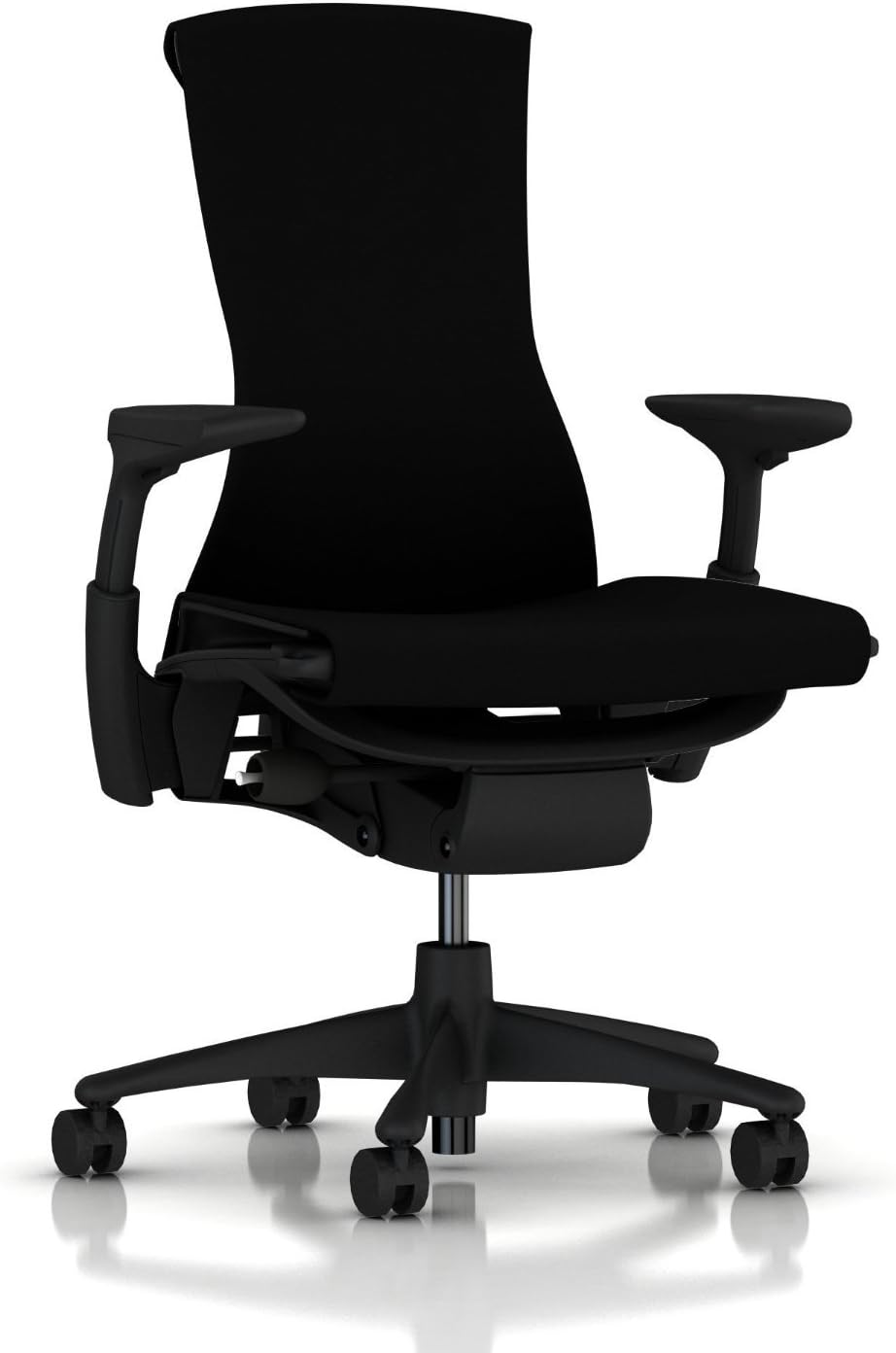
Herman Miller x Logitech Embody (Gaming)
The “Gaming” Embody includes extra cooling foam and a distinctive aesthetic. Ergonomically equivalent to the standard Embody—widely considered the most comfortable chair available for long-session use.
Check Price on Amazon