
Quick Overview & First Impressions
The DJI Osmo Pocket 3 is not just an upgrade—it is a total reinvention of the pocket gimbal category. Released to widespread acclaim, it addressed nearly every complaint users had with the Pocket 2. It remains the gold standard for portable vlogging, content creation, and travel filmmaking.
The headline feature is the 1-inch CMOS sensor, a massive leap in size that transforms low-light performance from “grainy mess” to “cinematic brilliance.” Paired with a clever 2-inch rotatable OLED screen that switches instantly between horizontal (YouTube) and vertical (TikTok) shooting, it feels like a device built specifically for the modern content creator.
Holding it for the first time, it feels substantial yet balanced. Not a toy. A precision instrument. The startup time is instantaneous—flip the screen, and you are recording in under 2 seconds. That speed matters when the moment is happening right now.
What’s in the Box
DJI sells the Pocket 3 in two configurations: the Standard package and the Creator Combo. We reviewed the Creator Combo, and frankly, it is the one you should buy if you are serious about content creation.
Standard Package:
- DJI Osmo Pocket 3
- Protective Cover
- Wrist Strap
- Handle with 1/4″ Thread
- USB-C PD Cable
Creator Combo Adds:
- DJI Mic 2 Transmitter — pairs wirelessly without a receiver, giving you broadcast-grade audio instantly
- Mic 2 Windscreen & Magnet
- Battery Handle — extends runtime significantly and provides a more ergonomic grip for long shoots
- Mini Tripod — small but surprisingly stable for solo self-filming
- Carrying Bag — well-constructed and genuinely pocketable
The inclusion of the DJI Mic 2 in the combo is transformative. On its own, the Mic 2 retails for around $130. Getting it bundled with the camera saves you real money while eliminating the need to research a separate wireless mic system for your first day of shooting.

DJI Osmo Pocket 3 Creator Combo
Get the full kit with the Mic 2, Battery Handle, and Tripod. The ultimate setup for solo creators who want pro results from day one.
Check Bundle PriceDesign and Build Quality
The Pocket 3 features a robust, matte-finish body that resists fingerprints and feels premium to the touch. The grip is slightly thicker than the Pocket 2, which is a deliberate improvement—it fits more naturally in an average-sized hand and reduces fatigue during extended handheld shooting.
The joystick is tactile and responsive, a massive improvement over the tiny nub on previous models. You can flick precisely between settings, adjust the gimbal direction, and navigate the menu system all with your right thumb without shifting your grip. This one-handed operability is central to everything the Pocket 3 does well.
The gimbal mechanism itself feels sturdy. When powered off, the camera head automatically parks in a “safe” position, protecting the motors during transport. The included protective cover is essential—you would not want to throw this naked into a bag alongside keys or coins.
Heat dissipation is noticeably improved over the Action 2 and older Pocket models. While the unit gets warm during sustained 4K/60fps recording, it rarely throttles to the point of shutdown. DJI’s thermal management engineering here is genuinely impressive for a device this compact.
The rotating screen mechanism is one of the few components that feels like it could wear out over time with very heavy use. Treat it with care—avoid forcing it past its natural stopping points, and it will last indefinitely under normal conditions.
Portability and Handling
Is it actually “pocket” sized? Yes—but think “jacket pocket” rather than “skinny jeans pocket.” It is taller and heavier than the Pocket 2 (179g vs 117g), but the trade-off for the larger sensor, bigger screen, and improved battery life is overwhelmingly worth it for any serious shooter.
Handling is intuitive. You can operate the entire device with one thumb. The rotatable screen acts as the power switch, which is elegant and fast. For travelers who are tired of lugging a mirrorless body, a separate gimbal, a wireless microphone receiver, and a lighting kit, the Pocket 3 represents genuine liberation.
For solo content creators—particularly vloggers who film themselves while walking and talking—the Pocket 3 is the best tool available at any price. Its small size means it is never intimidating to passersby (unlike a phone on a large gimbal), and it fits discreetly into a coat pocket when not in use.
If you are packing for a trip, space is premium. See how the Pocket 3 fits into our ultimate 10-day packing list compared to a full camera rig.
Image & Video Quality: The 1-Inch Sensor Magic
This is where the Pocket 3 leaves smartphones in the dust. The 1-inch sensor physically captures more light per pixel than any phone sensor, which directly translates to cleaner images, richer colors, more natural background blur, and substantially better performance in difficult lighting conditions.
Low Light Performance
We tested this in a dimly lit Tokyo alleyway at night with only neon signage for illumination. The noise levels were minimal. The automatic “Low Light Mode” preserves detail in shadows without turning footage into an impressionistic blur of color. It outperforms the iPhone 15 Pro and GoPro Hero 12 Black significantly in dark environments—not by a small margin, but meaningfully and consistently.
Color Profiles
For professional editors, the 10-bit D-Log M profile offers extraordinary flexibility in post-production color grading—the kind of latitude that was once reserved for cinema cameras. For casual users who just want to share directly without editing, the “Standard” profile produces punchy, pleasing colors with excellent skin tone rendering. It rarely looks over-processed or artificial the way some phone footage does.
Still Photography
The Pocket 3 can also shoot 20MP stills, which is capable but not its primary strength. The small fixed lens and lack of optical zoom limit versatility for photography. However, for travel documentation and capturing moments you would otherwise miss while fiddling with a bigger camera, the still quality is entirely respectable and vastly better than older Pocket models.
Stabilization Performance
Unlike Electronic Image Stabilization (EIS) used in phones and action cameras—which crops the frame to compensate for movement—the Pocket 3 uses a 3-axis mechanical gimbal that physically counteracts your movements in real time. This is a fundamentally different and superior technology.
The result is “tripod-like” stability even when walking briskly or navigating uneven terrain. There is zero micro-jitter. We conducted a running test alongside a GoPro Hero 12 with HyperSmooth, and while the GoPro produced very good results, the Pocket 3 achieved that cinematic “floating” quality that mechanical stabilization delivers and digital correction cannot fully replicate—especially in low light where EIS degrades significantly.
The gimbal handles fast panning well. It responds to intentional camera movement instantly while filtering out involuntary shakes. In Follow Mode, it smoothly follows your direction; in Tilt-Lock Mode, it keeps the horizon perfectly level no matter how you tilt your wrist. FPV Mode removes all stabilization for intentional dynamic shooting.
Mechanical gimbals work in low light because they are physically correcting movement rather than using software algorithms that rely on sufficient image data to function. This is why the Pocket 3 looks significantly better than GoPro at night—not just the sensor, but the stabilization technology too.
Features and Modes: ActiveTrack 6.0
ActiveTrack 6.0 borders on magic. Draw a box around a subject—or yourself—and the camera head moves physically to keep that subject centered (or positioned at the rule of thirds). Face Auto-Detect locks onto faces in under a second. Dynamic Framing keeps subjects positioned according to compositional principles rather than dead center, making your shots look more professionally composed without any deliberate effort.
The system handles partial occlusion well—if your subject briefly walks behind a post or moves out of frame momentarily, it re-acquires rather than losing lock entirely. For solo creators who need to film themselves while also doing something interesting, this feature is genuinely transformative.
Other notable shooting modes include SpinShot (for the cinematic roll effect), Motionlapse (time-lapse with camera movement), Ultra-Wide Mode, and Panorama. Product Showcase Mode is particularly clever for YouTubers—hold an object up to the camera and it instantly shifts focus to the product, then snaps back to your face when you lower it.
These automated features save significant time in production. Pair this camera with our guide on AI tools to automate daily tasks to streamline your entire content workflow.
Screen, Controls & Usability
The 2-inch OLED screen delivers 700 nits of brightness and vivid color accuracy. The rotating mechanism is stiff enough to feel durable but easy enough to flip with a single finger. The UI—swipe down for settings, right for playback, left for modes—is responsive and logically organized. It feels like using a premium smartphone interface.
Critically, because the screen is now larger, you can actually see what is in focus and frame your shots properly without squinting. This sounds like a minor improvement until you have tried to nail focus on a subject using the Pocket 2’s postage-stamp display, after which the Pocket 3’s screen feels genuinely transformative.
In bright outdoor sunlight, the 700-nit brightness is sufficient for visibility most of the time, though direct overhead sun can still make it difficult to see clearly. Slight shading with your hand solves the problem instantly.
Audio Quality & DJI Mic 2
The internal 3-mic array is surprisingly capable, utilizing wind reduction algorithms to capture clear vocal audio in mild conditions. It records in stereo and picks up environmental ambience with a natural, pleasing quality. For YouTube uploads, Instagram, or casual vlogging, the internal audio is entirely presentable.
However, the DJI Mic 2 integration is the real differentiator. The Pocket 3 has a built-in receiver for the Mic 2 transmitter. Turn on the mic, and it connects instantly with zero configuration. No dongles, no receiver adapters, no wires dangling from the camera. The audio output is broadcast-grade (48kHz, 24-bit), and you can pair two Mic 2 transmitters simultaneously for two-person interviews. This eliminates the need for a separate $200–300 wireless mic system.
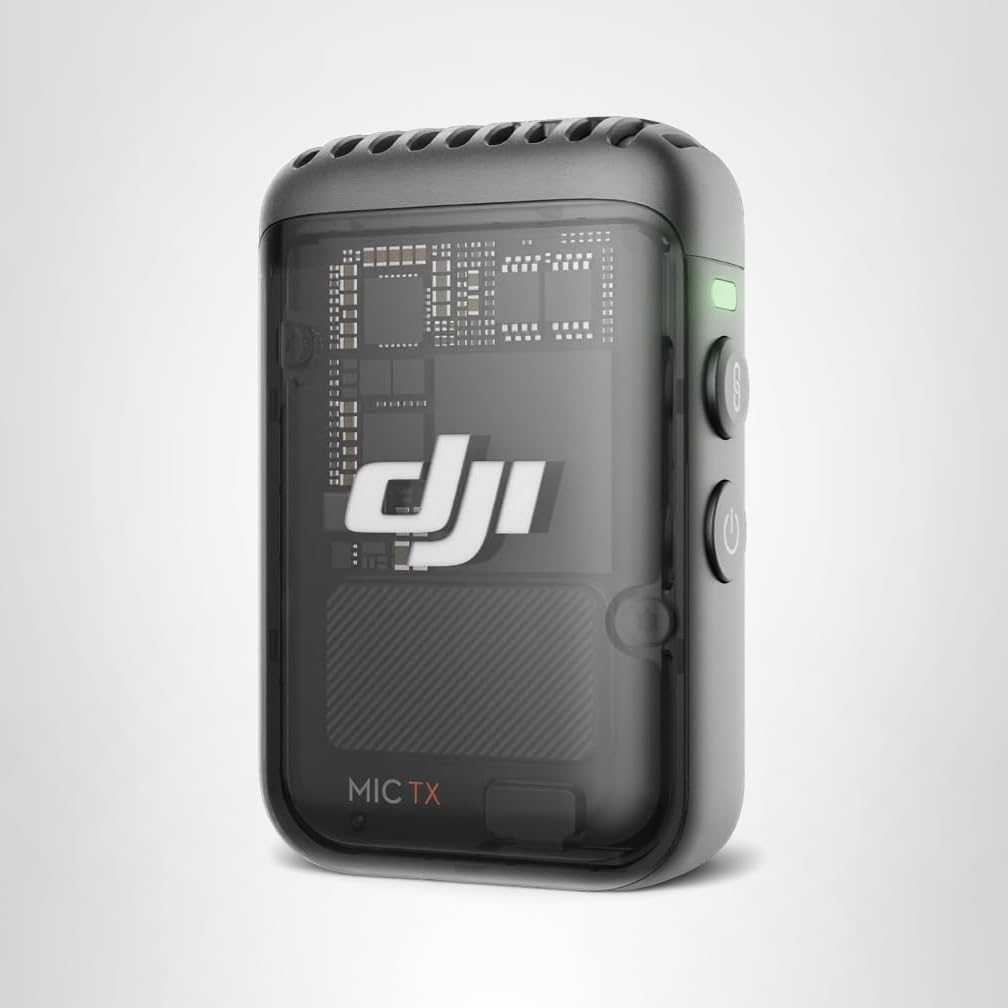
Add Extra Mic: DJI Mic 2 (Transmitter Only)
Already own the camera? Add a second transmitter for interviews. Connects seamlessly without any receiver hardware needed.
Buy TransmitterBattery Life and Charging
The internal battery delivers approximately 166 minutes of 1080p recording or roughly 100 minutes of 4K/60fps in real-world mixed usage—filming clips, reviewing footage, and periods of standby. It comfortably covers a full afternoon of travel filming without needing to reach for a power bank.
Charging is remarkably fast. Using a PD-capable charger, the battery reaches 80% in just 16 minutes. This quick-charge capability is genuinely useful when you only have a short window to top up before heading back out to film. The Creator Combo’s Battery Handle provides an additional battery that adds roughly 60% more total capacity while simultaneously giving you a more ergonomic long-grip hold during extended shoots.
Extend your tech battery management knowledge with our smartphone settings guide to preserve battery life across all your devices.
Connectivity and Accessories
The DJI Mimo app connects via Wi-Fi and Bluetooth. It allows for live monitoring on your phone (invaluable when the camera is on a tripod and you are in front of it), fast wireless file transfer, and access to advanced settings not available on the device’s touchscreen interface.
The Pocket 3 also functions as a high-quality webcam via USB-C connection, delivering significantly better image quality than the built-in cameras on most laptops. For professional-grade Zoom or Teams calls, this is an immediate and noticeable upgrade over any integrated webcam.
Accessories worth considering:
• ND Filters: Magnetic snap-on filters for maintaining proper shutter speed (180-degree rule) in bright sunlight.
• Black Mist Filter: Softens highlights for a cinematic, film-like look.
• Expansion Adapter: Allows mounting the Pocket 3 onto GoPro-compatible accessories and mounts.
• Waterproof Case: Essential for any rain or water activity shooting.
DJI Osmo Pocket 3 vs. The Competition
The Pocket 3 does not exist in a vacuum. Before committing at its price point, it is worth understanding exactly how it stacks up against the most credible alternatives in the portable camera space.
| Camera | Sensor | Max Video | Stabilization | Low Light | Price (approx.) |
|---|---|---|---|---|---|
| DJI Osmo Pocket 3 Best Pick | 1-inch CMOS | 4K/120fps | 3-axis mechanical | Excellent | $499 / $669 Combo |
| DJI Osmo Pocket 2 | 1/1.7-inch | 4K/60fps | 3-axis mechanical | Good | ~$280 (discontinued) |
| GoPro Hero 12 Black | 1/1.9-inch | 5.3K/60fps | EIS (HyperSmooth 6) | Fair | $399 |
| Sony ZV-1 II | 1-inch CMOS | 4K/30fps | 5-axis EIS | Very Good | $749 |
| iPhone 15 Pro | 1/1.28-inch | 4K/60fps + ProRes | OIS + EIS | Good | $999+ |
vs. GoPro Hero 12 Black
This is the most common comparison buyers make, and it largely comes down to intended use. The GoPro Hero 12 is rugged, waterproof, and built for extreme action. It excels strapped to a helmet, attached to a surfboard, or submerged underwater. The Pocket 3 is not waterproof and would not survive any of those scenarios. However, for vlogging, travel documentation, and any scenario where you are behind the camera rather than wearing it, the Pocket 3 produces visibly more cinematic footage with richer low-light performance and dramatically better audio (especially with the Mic 2). If you shoot action sports, choose GoPro. For everything else, choose Pocket 3.
vs. Sony ZV-1 II
The Sony ZV-1 II is an excellent vlogging camera with a 1-inch sensor and superb autofocus, but it is a traditional fixed-lens camera with a flip-out screen rather than a mechanically stabilized gimbal camera. The ZV-1 II has better subject-tracking autofocus in complex situations and more lens versatility. However, the Pocket 3 produces smoother handheld footage thanks to mechanical stabilization, costs less, is far more pocketable, and has the integrated wireless mic system. For solo self-filming on the move, the Pocket 3 wins convincingly.
vs. iPhone 15 Pro
The iPhone 15 Pro shoots stunning ProRes video and has remarkable computational photography capabilities. For documentary-style footage, interviews, or high-end commercial content where you want maximum post-production latitude, ProRes on iPhone is extraordinary. However, for handheld walking-and-talking vlog content, the Pocket 3’s mechanical stabilization is visibly smoother. And the Pocket 3 with a DJI Mic 2 produces far better audio than an iPhone in most scenarios. For creators who already own an iPhone 15 Pro, the Pocket 3 is a compelling complement rather than a replacement—use the phone for hero shots and the Pocket 3 for fluid B-roll and self-filming.
vs. DJI Osmo Pocket 2
If you already own a Pocket 2 and are considering the upgrade, the jump is substantial. The 1-inch sensor is a generational leap in low-light capability—it is not a marginal improvement. The rotating screen eliminates the need for external accessories to shoot vertically. The ActiveTrack 6.0 tracking is more reliable, faster to re-acquire lost subjects, and handles backlit or partially obscured subjects far better. The Pocket 2 remains a capable camera for well-lit outdoor shooting, but if you ever film indoors, at dawn/dusk, or in any challenging light, the Pocket 3 upgrade pays for itself immediately in footage quality.
Best Settings Guide: What to Use and When
One of the most common questions from new Pocket 3 owners is: what settings should I actually be using? The camera’s default automatic modes are capable, but understanding when to switch to manual control unlocks the full potential of the 1-inch sensor. Here is a practical settings guide organized by shooting scenario.
The 180-Degree Shutter Rule
Before anything else, understand this fundamental principle: your shutter speed should be double your frame rate for natural-looking motion blur. At 24fps, use 1/50s. At 30fps, use 1/60s. At 60fps, use 1/120s. Shooting in bright daylight with these shutter speeds requires ND filters (covered in the accessories section), as the f/2.0 aperture cannot be adjusted. Ignoring this rule produces footage that looks choppy and “video-ish” rather than cinematic.
| Scenario | Resolution / FPS | Color Profile | ISO Range | Level |
|---|---|---|---|---|
| Everyday vlogging | 4K / 30fps | Standard | Auto | Beginner |
| Cinematic travel B-roll | 4K / 24fps | D-Log M (10-bit) | 100–800 | Pro |
| Indoor / low light | 4K / 24fps | Low Light Mode | Auto (max 6400) | Beginner |
| Slow motion | 4K / 120fps or 1080 / 240fps | Standard or Normal | 100–400 | Advanced |
| TikTok / Reels (vertical) | 1080p / 60fps | Standard | Auto | Beginner |
| Color grading projects | 4K / 30fps | D-Log M (10-bit) | 100–1600 | Pro |
| Action tracking | 4K / 60fps | Standard | Auto | Beginner |
| Webcam use | 1080p / 30fps | Standard or Vivid | Auto | Beginner |
At 130Mbps bitrate in 4K/120fps mode, the Pocket 3 demands fast storage. Use a SanDisk Extreme Pro V30 A2 or Samsung EVO Select V30 card rated at 100MB/s+ write speed. Budget cards will cause dropped frames and recording interruptions. A 128GB card is the minimum practical size for a full day of 4K shooting.
Top Accessories: Building Your Pocket 3 Kit
The Pocket 3 is remarkably capable straight from the box, but the right accessories can meaningfully extend what it does and how long it does it for. Here are the most valuable additions for different creator types.
Essential for outdoor shooting. Maintains proper shutter speed (180-degree rule) in bright sunlight. DJI’s magnetic ND set (ND16, 64, 256) snaps on and off in seconds.
Essential for outdoor shootingAdds ~60% more battery capacity and creates a more natural long-grip hold for extended shoots. Included in Creator Combo.
Essential for all-day shootsA second transmitter enables two-person interview recording. Both connect simultaneously to the built-in receiver without any additional hardware.
Essential for interviewsProtects the camera to 45m depth. Required for any rain-heavy environments, beach use, or water sports filming. Not included in any bundle.
Essential near waterDiffuses highlight clipping and creates a subtle cinematic glow around light sources. Gives the footage a more filmic, analog quality that standard shooting lacks.
Recommended for film lookConnects the Pocket 3 to any standard GoPro mount ecosystem—chest mounts, helmet mounts, bike mounts, suction cups. Dramatically expands shooting versatility.
Recommended for travelA flexible mini tripod wraps around rails, branches, or bars and positions the camera at impossible angles for creative B-roll shots.
Useful for solo filmingA small magnetic fill light (such as the SMALLRIG Mini) clips onto the handle and dramatically improves indoor and low-light close-up footage quality.
Useful for indoor workD-Log M Color Grading: Unlocking Cinematic Color
If you shoot in D-Log M and then play the footage back unedited, it will look washed out, flat, and desaturated. This is intentional. D-Log M is a flat color profile that preserves maximum dynamic range by compressing the tonal values into the middle of the histogram, leaving headroom at the top and bottom for post-production adjustment.
Think of it like taking a RAW photograph versus a JPEG. The JPEG looks polished straight away, but the RAW file contains far more information that you can pull out during editing. D-Log M video gives you approximately 12.8 stops of dynamic range—meaning you can recover detail from very bright highlights and very dark shadows that the Standard profile would clip to pure white or pure black.
Basic D-Log M Workflow in DaVinci Resolve
For creators new to color grading, here is a straightforward workflow using the free version of DaVinci Resolve:
- Import your D-Log M footage and drop it in the timeline.
- In the Color page, add a Color Space Transform node. Set Input to DJI D-Log M and Output to Rec. 709.
- This single transform gives you a proper “base grade” that looks natural and pleasing.
- From there, add contrast, lift shadows, adjust saturation, and apply any creative look you want.
- For a film-like look, try reducing saturation slightly, adding a subtle S-curve, and warming the highlights.
D-Log M performs beautifully when properly exposed (ETTR—expose to the right, keeping highlights just below clipping). Underexposed D-Log M footage contains excessive noise in shadow regions that is very difficult to recover in post. When in doubt, expose slightly brighter than you think you need to.
LUTs for the Pocket 3
A LUT (Look-Up Table) is a one-click color preset that transforms your D-Log M footage into a specific visual style. DJI provides free official LUTs for the Pocket 3 on their website that apply a clean, accurate Rec. 709 conversion. Third-party LUT packs from creators like Ground Control, Film Riot, and others offer cinematic presets tailored specifically to DJI’s D-Log M color science.
Slow Motion and Shooting Modes: A Complete Breakdown
The Pocket 3’s 4K/120fps capability is one of its most exciting specifications for creative filmmakers, but understanding how to use the various shooting modes correctly makes an enormous difference to the end result.
Slow Motion: 4K/120fps vs. 1080p/240fps
The camera offers two primary slow motion options. At 4K/120fps, you capture four times the normal frame rate—played back at 24fps, this gives you 5x slow motion with full 4K resolution. This is exceptional for close-up product details, water splashes, running athletes, or any dynamic action where you want a dramatic slow-down while maintaining the resolution to crop in post.
At 1080p/240fps, you get 10x slow motion—a silky crawl that is dramatically cinematic for the right moments. However, at 1080p resolution, the footage is softer and contains less detail than the 4K option. Use 240fps for wide hero shots where you want pure drama; use 120fps when you need to punch in on details without losing sharpness.
Both slow motion modes require good light. At high frame rates, the sensor needs more light to produce clean images. In low light, high-frame-rate slow motion footage becomes grainy and unusable. Shoot slow motion in daylight or well-lit controlled environments for best results.
Motionlapse
Motionlapse combines time-lapse with gimbal movement, sweeping the camera across a scene while compressing time. This is ideal for capturing busy cityscapes, sunset transitions, or any scene where you want both the dynamism of a moving time-lapse and the temporal compression of a standard time-lapse. The gimbal handles the movement smoothly without any additional hardware.
SpinShot
SpinShot rotates the camera axis while recording, creating the disorienting cinematic roll effect popularized in Inception. Used sparingly, it adds visual dynamism to travel montages and establishes shots. Used too frequently, it becomes gimmicky—treat it as a seasoning, not a main course.
Product Showcase Mode
This mode uses the camera’s AI to detect when you hold an object up in front of it, instantly shifting focus from your face to the product, then returning focus to your face when you lower the object. For product review YouTubers and gear-focused vloggers, this is genuinely useful and well-implemented.
DJI Mimo App: A Deep Dive
The DJI Mimo app is the Pocket 3’s command center for advanced users and deserves more attention than most reviews give it. Available for iOS and Android, it connects to the camera via Wi-Fi and Bluetooth, enabling a level of control that goes significantly beyond what the on-device touchscreen offers.
Live Monitoring
When the Pocket 3 is mounted on a tripod and you are the subject, the camera’s 2-inch screen is facing away from you and becomes useless for framing. The Mimo app turns your smartphone into a remote monitor, showing a live feed of exactly what the camera sees. This is essential for solo creators and eliminates the constant repositioning that plagues self-filming with cameras that lack remote monitoring.
Remote Control
Via the app, you can pan, tilt, and zoom the gimbal remotely, trigger recording start and stop, switch between shooting modes, and adjust settings—all from your phone screen while standing in front of the camera. For product demonstrations, cooking videos, or tutorial content where you need to move freely while the camera follows you, this remote control functionality is invaluable.
Story Mode Templates
Mimo includes built-in “Story Mode” templates that automatically guide you through a sequence of shots (establish wide, medium, close-up) and then automatically edit them together with music into a finished short video. This is aimed at casual users who want polished results without learning editing software. The output is not cinema-quality, but for social media content, it is impressively functional and fast.
File Transfer
The Mimo app enables wireless file transfer from the camera to your phone. This is slower than a USB-C cable connection but useful when you need to grab a specific clip quickly for an Instagram Story or TikTok post without returning to your laptop. Transfer speeds via Wi-Fi are adequate for 1080p clips but can feel slow for 4K files.
Always check for firmware updates in the Mimo app before a shoot. DJI regularly releases firmware updates that add new features, fix bugs, and improve stabilization algorithms. Several post-launch updates have meaningfully improved ActiveTrack responsiveness and overheating thresholds on the Pocket 3.
Webcam Mode and Live Streaming
The Pocket 3’s webcam capability via USB-C is one of its most underrated features for creators who also produce live content or work from home. When connected to a laptop or desktop via a standard USB-C cable, the camera is recognized immediately as a webcam input in Zoom, Teams, OBS Studio, Streamlabs, and virtually every other video conferencing or streaming platform.
Webcam Image Quality
The difference between the Pocket 3 as a webcam and a typical laptop integrated camera is stark. The 1-inch sensor delivers natural background separation (shallow depth of field), accurate color rendering, and dramatically better performance in office lighting conditions than any laptop camera. If you appear regularly on video calls, run a YouTube channel with livestreams, or create any kind of talking-head content, the Pocket 3 as a webcam is a legitimate professional upgrade.
Live Streaming via OBS
In OBS Studio, add the Pocket 3 as a video capture device source (it will appear automatically once connected via USB-C). Set the resolution to 1080p/30fps for reliable streaming performance, and enable the Standard color profile—D-Log M looks flat and washed out on live streams where there is no opportunity for color grading. The integrated 3-mic array also works as an audio input, though a dedicated USB microphone or the Mic 2 transmitter with a USB-C adapter will produce better audio specifically optimized for streaming.
While streaming via USB-C, the Pocket 3 continues to charge from the laptop if using a Thunderbolt or high-power USB-C port. For long streaming sessions, this prevents battery drain entirely. Using an external USB-C PD charger simultaneously via a USB-C hub is recommended for marathon streaming sessions.
Common Problems, Limitations, and Fixes
No camera is without its frustrations. The Pocket 3 is excellent, but there are known issues and limitations that every owner should understand before they encounter them in the field.
Problem 1: Rolling Shutter in High-Speed Panning
Like all CMOS sensor cameras (including the most expensive cinema cameras), the Pocket 3 exhibits rolling shutter when you pan rapidly. Fast horizontal camera movement causes vertical lines in the frame to appear slightly tilted or to “jello” (wobble). The fix: avoid very fast panning when possible. The gimbal’s smooth movement actually mitigates this naturally—it is only an issue when you physically rotate your body very quickly. For intentional fast pans, the SpinShot mode is designed for this purpose and handles rolling shutter better than a manual pan.
Problem 2: Overheating in Sustained 4K Recording
Extended 4K/60fps or 4K/120fps recording in warm environments (above 25°C ambient temperature) can trigger thermal throttling after 40–60 minutes of continuous recording. This has improved significantly since launch via firmware updates but has not been eliminated entirely. The fix: take short breaks between long recording segments. Switch to 1080p if you need to record for very long continuous durations in warm conditions. Using the Battery Handle also improves heat dissipation by giving the main body more surface area indirectly.
Problem 3: Narrow Field of View at Max Zoom
The Pocket 3 has a fixed 20mm equivalent lens at its widest setting. It offers digital zoom, but digital zoom reduces image quality proportionally. There is no optical zoom option. For close-up shots of distant subjects—wildlife photography, sports events from the stands—the Pocket 3 is simply not the right tool. This is a fundamental physical limitation of the design, not a flaw that can be patched.
Problem 4: No Built-in Storage
The Pocket 3 has no internal storage and requires a MicroSD card to record. Forget your card, and the camera is unusable (it will not allow recording to anything else). Always carry a backup card. Keep a 32GB card in your wallet as an emergency option—even if it is not fast enough for 4K/120fps, it will handle 1080p and 4K/30fps perfectly fine.
Problem 5: Wind Noise on Internal Microphone
The internal mics, while good indoors, struggle with wind. Even modest breezes create audible rumble that is distracting in footage. The fix: use the DJI Mic 2 with its included windscreen in any outdoor recording situation. Alternatively, the foam windscreen attachment designed for the Pocket 3’s mic array (available as a third-party accessory) provides meaningful improvement for casual outdoor use.
Who Should Buy It?
Vloggers & YouTubers: The Pocket 3 is the best self-filming tool in existence. The tracking keeps you in frame, the mic sounds professional, the stabilization is cinematic, and it fits in a jacket pocket. Nothing else at this price point matches its combination of capabilities for solo content creators.
Solo Travelers: Capture cinematic B-roll of your trips without carrying a heavy camera bag. The Pocket 3 produces footage that looks thoughtfully filmed, not grabbed opportunistically on a phone. For travel content that aspires to a cinematic standard, it is the logical choice.
Parents: Chase your children around the park and capture the moment with genuinely cinematic quality. The gimbal stabilizes running, the autofocus is fast enough for toddlers, and the footage quality will make home videos look like they were produced with professional equipment.
Small Business Owners & Marketers: Product videos, facility tours, team culture content—the Pocket 3 handles all of these with a production quality that previously required hiring a videographer. For bootstrapped businesses that need video content regularly, it pays for itself in the first few months.
Podcast and Interview Creators: With two Mic 2 transmitters connected simultaneously and the camera on a mini tripod, the Pocket 3 becomes a competent two-person interview camera with wireless broadcast-grade audio. It is not a replacement for a full studio setup, but for on-location interview content, it is remarkably capable and fast to deploy.
If you are traveling on a budget, this camera replaces thousands of dollars of separate gear. See our guide on cheapest European cities to visit to plan your next shoot.
Pros and Cons
- Massive 1-inch sensor for superb low light performance
- ActiveTrack 6.0 is responsive, fast, and reliable
- DJI Mic 2 built-in receiver is a genuine differentiator
- 80% charge in just 16 minutes via PD charging
- Rotatable screen is an elegant UX breakthrough
- 10-bit D-Log M for professional post-production flexibility
- 4K/120fps slow motion with full resolution retention
- Seamless webcam function via USB-C
- Improved heat management versus previous models
- Not waterproof without purchasing a separate case
- Creator Combo price is significant at $669
- No built-in storage — MicroSD card is mandatory
- Battery is not user-replaceable in the field
- Rolling shutter visible in fast horizontal pans
- Fixed 20mm lens — no optical zoom capability
- Wind noise on internal mics is a limitation outdoors
Final Verdict
The DJI Osmo Pocket 3 is a masterpiece of engineering. It solves the friction of content creation—eliminates the need to balance a gimbal, sync audio, or carry a heavy camera bag. It just works, in almost every situation, for almost every creator type.
While the Creator Combo price is high, the value proposition is undeniable. You are getting a cinema-quality camera with a 1-inch sensor, a 3-axis mechanical gimbal, a built-in wireless mic receiver, a 2-inch OLED rotating screen, and one of the fastest-charging batteries in its class—all in a device that fits in your jacket pocket.
The 0.5-point deduction is for the lack of waterproofing, the non-replaceable battery, and the absence of built-in storage—all genuine inconveniences for specific use cases. But for the vast majority of content creators, this camera represents the best tool available at any price for portable, cinematic, stabilized footage creation.
If you create video content, this is the best tool you can buy.